XP时代即有预读优化,Win7/Vista继承并演变为Superfetch/Prefetch。三招优化:
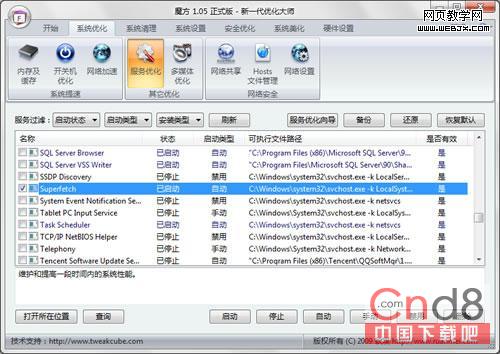
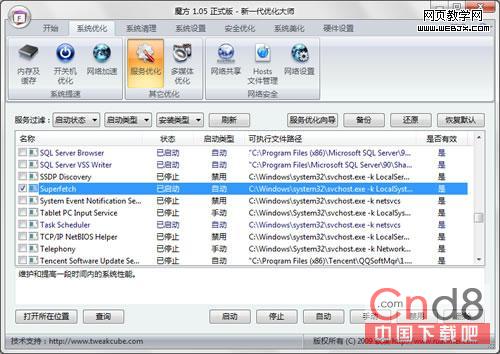
魔方/优化大师 → 服务优化 → 找Superfetch(XP称Prefetch) → 停止并设为“手动”。彻底禁止索引文件生成,开机不读PF文件。副作用:常用程序启动可能变慢。
注册表:HKEY_LOCAL_MACHINE\SYSTEM\CurrentControlSet\Control\Session Manager\Memory Management\PrefetchParameters
双击EnablePrefetcher,值3(系统+应用)改为2(仅系统)。重启后仅预读Windows系统文件,跳过应用程序索引,平衡开机速度与常用软件启动体验。
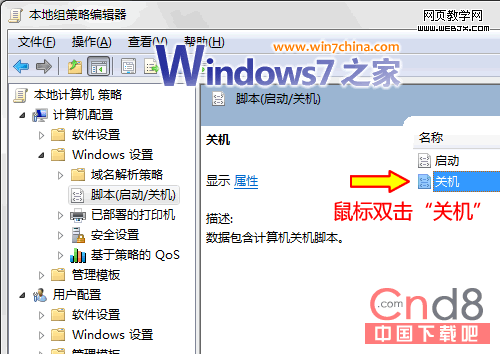
del %systemroot%\Prefetch\*.* /q 为del.bat。gpedit.msc → 计算机配置 → Windows设置 → 脚本 → 关机 → 添加del.bat。Prefetch,下次开机重新学习,避免陈旧索引拖累。三招组合:仅预读系统文件 + 关机清空 效果最佳,既保系统开机快,又防索引陈旧,应用启动靠自身加载器。XP用户同理操作Prefetch服务/键值。