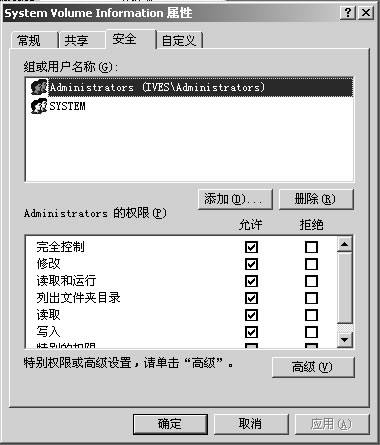
建立的系統還原點突然消失,事件檢視器顯示「系統還原服務被暫停,因磁碟機 C: 可用空間不足 200MB」。只要釋放空間並重新授權存取 System Volume Information 資料夾,還原點即可恢復。
System Volume Information
Administrators
完成後系統還原服務會自動重啟,原有還原點重新出現在還原精靈中。建議定期檢查 C 槽剩餘空間,避免還原服務再次暫停。
遠端桌面連線進階技巧(二):啟用磁碟重導向,安全傳檔免共用資料夾風險
善用 Windows 內建 subst 指令,打造免安裝虛擬磁碟
老生常談 Win XP 網路技巧:搜尋、診斷、修復 IE、查 IP 全攻略
WinXP 登入畫面需手動點擊使用者才能輸入密碼?停用 Guest 帳號恢復直接登入
常見軟體後遺症修復實戰 (1):一鍵還原精靈殘留隱藏分區、IE7 破解版缺 normal.dll 無法進桌面
找回消失的「隱藏非作用中圖示」選項:群組原則修復 gpedit.msc
XP 程式在 Windows 7 環境下的相容性解決方案完整指南
WinXP 無法玩網頁遊戲?用 360 安全衛士「XP 自助門診」一鍵修復