Windows XP Windows 7 Windows 2003 Windows Vista Windows 綜合教學 Linux 系統教學
Windows 10 Windows 8 Windows 2008 Windows NT Windows Server 電腦軟體教學

Windows XP 也能享受純淨 Vista/Longhorn 主題體驗

編輯:Windows Vista 教學

筆者參考網路教學在 XP 中安裝 Vista 主題(實為 Longhorn 5203 主題),原教學步驟繁瑣且不一定成功。經研究簡化流程後順利安裝,現分享精簡方法:

準備工作

  1. 下載 UXPatcher 與 Longhorn 主題檔案(文末提供下載連結)。
  2. 為安全起見,備份 C:\Windows\System32\uxtheme.dll。

安裝步驟

  1. 執行 UXPatcher。若彈出「Windows 檔案保護」對話框,點選「取消」——這代表即將成功。
  2. 重新開機。
  3. 解壓縮 Longhorn 主題至 C:\Windows\Resources\Themes(建議同時解壓至 D 或 F 槽備份),將 Fonts 資料夾內的字體檔複製至 C:\Windows\Fonts。
  4. 執行主題檔(.theme),即可套用。

成功了嗎?


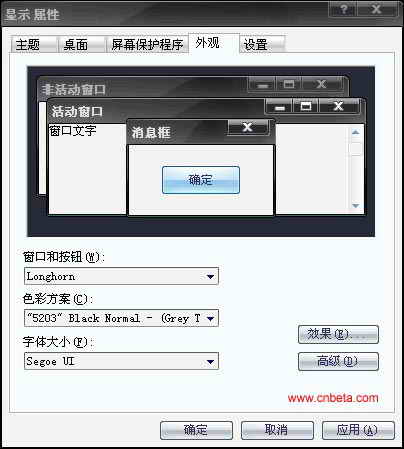
出現 Longhorn (Vista) 主題選項
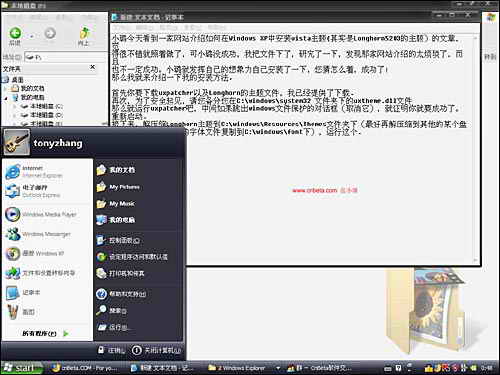
筆者測試成功,XP 也能擁有 Vista 風格介面!

Copyright © Windows教程網 All Rights Reserved