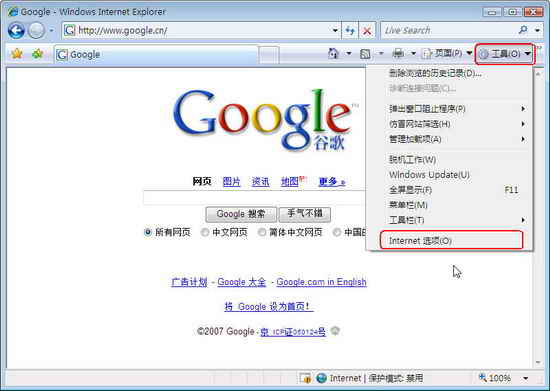
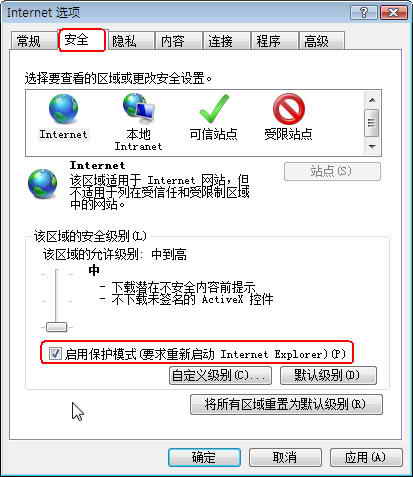
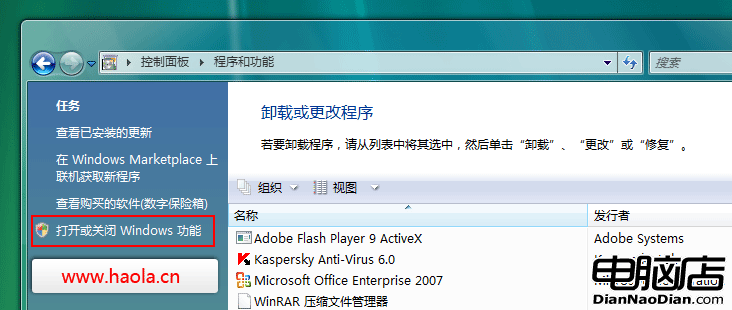
Vista 系統下使用 IE7 直接下載或右鍵「另存為」時,文件下載完成卻在保存目錄找不到,罪魁禍首是 IE7 默認開啟的「保護模式」。
操作完成後,下載文件將正常顯示在指定保存目錄中。
Windows Vista 常見硬體驅動程式彙整清單 (依廠商分類)
XP/Vista 雙系統共用資源優化磁碟空間技巧
Windows Vista 八大實用應用技巧總整理
10 招加速 Vista 啟動與執行速度:驅動更新、精簡功能、優化大師、服務管理、啟動項、ReadyBoost、視覺效果、SATA 效能、登錄優化、磁碟重組
找回 Vista 商業版缺失的內建遊戲
Vista 傳真與掃描傳輸中斷?修改登錄調整調讀解調器類別 (Class 1/2/2.0) 修復
解決 Vista/XP 「資源回收筒損毀」錯誤,命令列快速重建
善用 NTFS 磁碟配額封鎖惡意程式上傳:Vista/Win 7 進階防禦實戰