32 位元 Vista 預設 Desktop Heap(桌面堆疊)僅 3072KB,存放視窗、選單、控制項等 GUI 物件。開啟大量視窗時,即使實體記憶體充足,Desktop Heap 耗盡仍會導致無法開新視窗、視窗殘缺或彈出「記憶體不足」。
修改登錄檔擴大 Desktop Heap:
regedit 導航至 HKEY_LOCAL_MACHINE\SYSTEM\CurrentControlSet\Control\Session Manager\SubSystems。Windows 值,找到 SharedSection=1024,3072,512 中的第二參數(3072)。4096(輕度)或 8192(重度多視窗使用者)。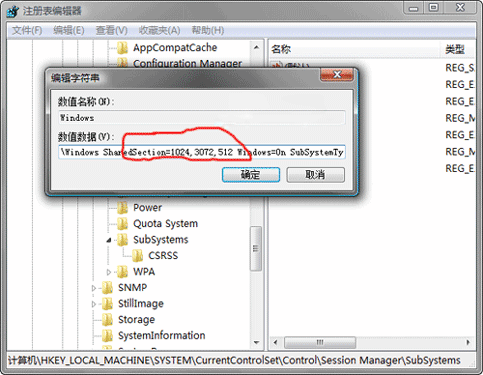
⚠ 風險提示:過大可能影響系統穩定,建議漸進式調整;若物理記憶體極小(<1GB),根本解決仍需加裝記憶體。
Vista 視窗彈出加速與關機等待縮短:關閉動畫效果、調整服務/程序終止超時註冊值
Windows Media Player 11 最小化不見工具列?工作列右鍵→工具列→勾選 WMP 即刻召喚
提升 Vista 多線程下載速度:關閉 TCP Auto-Tuning 完整指令教學
解除 Vista SP2/Windows 7 TCP/IP 半開連線數限制:修改註冊表 EnableConnectionRateLimiting
解決 Windows Vista/XP 回收站損壞錯誤的完整步驟
Windows Vista 音訊架構深度解析:四種音量控制機制完整說明