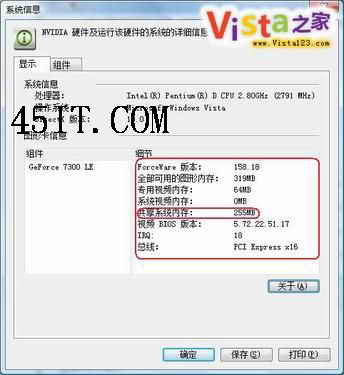
獨立顯卡(如 GF 7300 LE)在 Vista 下共享記憶體大小**由系統自動根據實體記憶體動態決定**,用戶無法手動調整。實測:512MB 記憶體共享 64MB,1GB 共享 255MB,2GB 共享 271MB;不同顯卡晶片策略不同。
整合顯卡(筆電常見)則可在 BIOS 中固定共享大小:
裝上獨顯後整合顯卡未自動停用?兩法擇一:
ThinkPad Vista 邊欄啟動失敗「Windows 邊欄停止回應」:移除 Lenovo Essentials 小工具解決
Vista 重開機自動進入安全模式:關閉 msconfig「安全開機」選項解決
關閉 Vista 煩人的「回報問題」對話框
修復 Vista 特殊資料夾(音樂/圖片/下載)圖示變黃色的問題
保障 Windows Vista 系統安全的八大實務措施
Vista 區域連線圖示不閃爍?啟用活動動畫即可恢復
Vista 無法存取 Linux Samba 共享?調整 LAN Manager 驗證等級破解 NTLMv2 衝突
Vista 局域網共享完全攻略:啟用網路探索、檔案共用、防火牆例外、服務優化