Windows XP Windows 7 Windows 2003 Windows Vista Windows 綜合教學 Linux 系統教學
Windows 10 Windows 8 Windows 2008 Windows NT Windows Server 電腦軟體教學

修改 Vista 登錄啟用大型系統快取,提升整體效能

編輯:Windows Vista 教學

Vista 中啟用「大型系統快取」可提升系統快取容量,進而改善電腦效能。透過登錄編輯器修改 LargeSystemCache 鍵值即可實現。

操作步驟

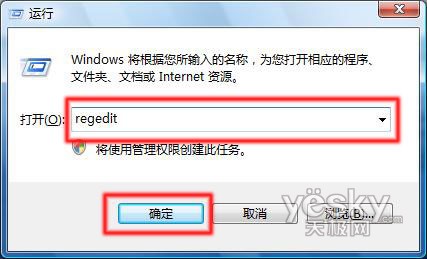
  1. 「開始」→「所有程式」→「附件」→「執行」,輸入 regedit 開啟登錄編輯器。
    執行 regedit
  2. 依序展開:HKEY_LOCAL_MACHINE → SYSTEM → CurrentControlSet → Control → Session Manager → Memory Management。
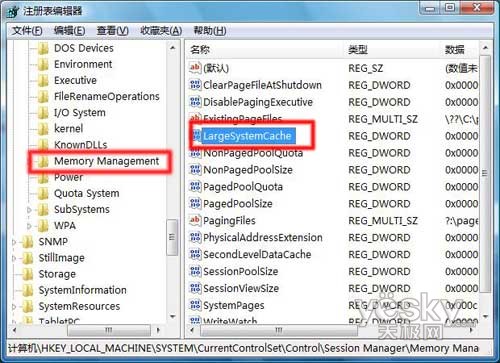
    登錄編輯器路徑
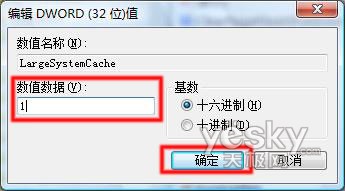
  3. 雙擊 LargeSystemCache,將「數值資料」從預設 0 改為 1,確定。
    修改 LargeSystemCache

注意:修改登錄有風險,請謹慎操作。修改完成後重啟生效,可提升系統整體效能。
Copyright © Windows教程網 All Rights Reserved