Vista 隱藏選單列設計強化了右鍵選單重要性。透過登錄檔微調,可為右鍵選單新增「加密/解密」、「複製為路徑」、「清空回收站」等高頻功能,大幅提升操作效率。
登錄檔路徑:HKEY_LOCAL_MACHINE\SOFTWARE\Microsoft\Windows\CurrentVersion\Explorer\Advanced
新增 DWORD EncryptionContextMenu = 1,按 F5 重整,檔案/資料夾右鍵即出現「加密」/「解密」。
於 HKEY_CLASSES_ROOT\Directory\Background\shellex\ContextMenuHandlers 新增機碼 {645FF040-5081-101B-9F08-00AA002F954E} (系統內建回收站擴充 CLSID),即可在任意空白處右鍵清空回收站。
按住 Shift 右鍵檔案/資料夾,預設即可看到「在此開啟命令視窗」與「複製為路徑」兩個隱藏項目,無需額外設定。
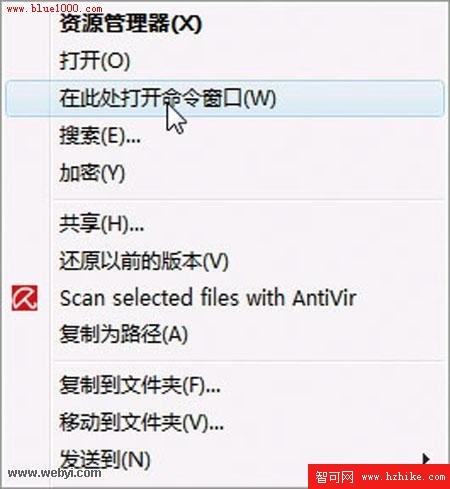
Shift + 右鍵顯示的擴充選單
以上修改均無需重開機,即時生效,讓 Vista 右鍵選單成為生產力利器。