在 Windows Server 2003 IIS 6.0 上手動部署 PHP 4.3.2 + MySQL 環境,解決 404 錯誤與擴展對應問題。
C:\php-4.3.2-Win32,將 php.ini-recommended 重命名為 php.iniphp.ini:extension_dir = "C:\php-4.3.2-Win32\extensions"session.save_path = "C:\php-4.3.2-Win32\sessions" (需手動建立 sessions 資料夾)php.ini 至 C:\WINNT,php4ts.dll 至 C:\WINNT\system32php、可執行檔 C:\php-4.3.2-Win32\sapi\php4isapi.dll.php、可執行檔 C:\php-4.3.2-Win32\sapi\php4isapi.dllphpinfo.php 驗證C:\mysql,將 my-example.cnf 改名 my.cnf 複製至 C:\C:\phpMyAdmin,修改 config.inc.php3 第 65 行語言設定為中文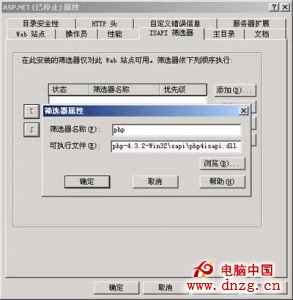
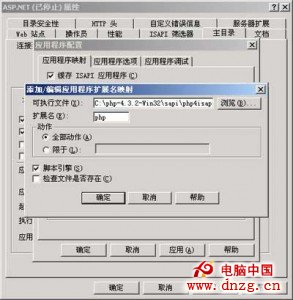
完成後 IIS 即可正常解析 PHP 腳本並連接 MySQL 資料庫。