Windows Server 2008 安裝後雖能辨識無線網卡並安裝驅動,但預設未啟用「無線區域網路服務」,導致無法連接無線網路。需透過伺服器管理員新增此功能。
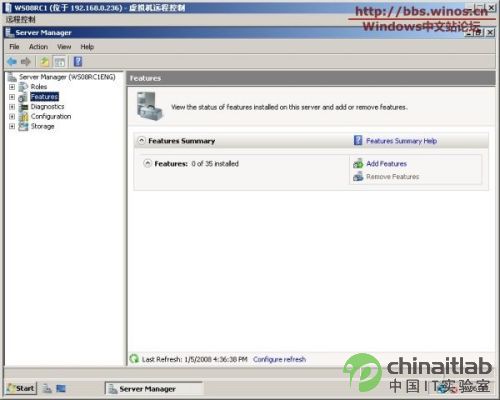
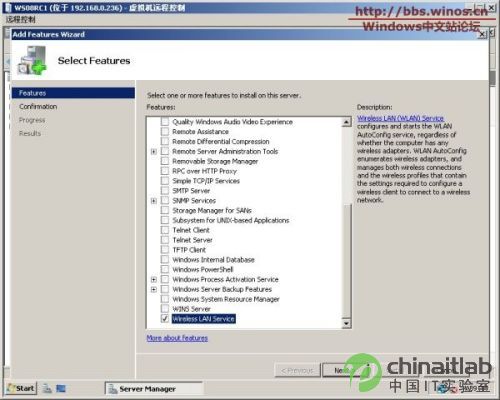
此功能對筆電或無線環境下的伺服器測試機極為實用。
強化 Windows Server 2003 安全性的四大關鍵設定
Active Directory 核心概念與邏輯結構入門 (一):目錄服務、網域、OU、樹、樹系完整說明
Windows 2000 建立 SMTP 虛擬伺服器:單一主機多域名郵件服務實作
Windows 2000 秘密武器:Snmputilg.exe SNMP 圖形化查詢工具詳解
Windows Server 2008 PKI 實戰(一):憑證服務部署與管理
Windows Server 2008 快速建立新使用者帳號的指令法
Windows 2000/NT/XP 遺失系統管理員密碼的兩大找回技巧
Windows 2000 Server 架設小型區域網路完整實作:Web/FTP/MAIL/ICQ 多服務共存與 ICS 共享上網