Windows XP Windows 7 Windows 2003 Windows Vista Windows 綜合教學 Linux 系統教學
Windows 10 Windows 8 Windows 2008 Windows NT Windows Server 電腦軟體教學
您现在的位置: Windows教程網 >> Windows教程 >  >> Windows Server 系統教學 >> Server 2003

Windows Server 2003 IIS 新增網站無法指定 IP 位址解決方案

編輯:Server 2003

現象

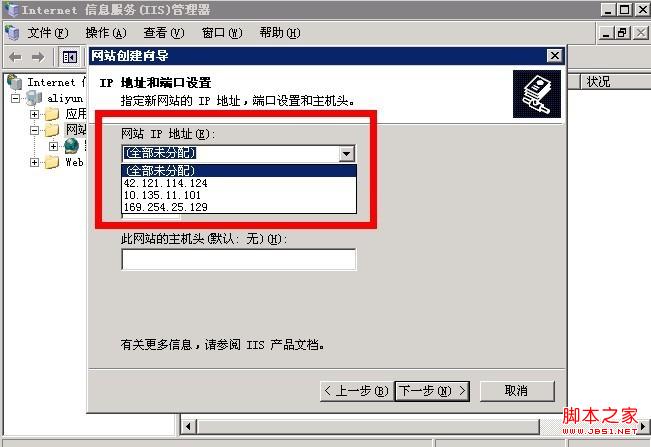
在 IIS 管理員中新增網站時,「IP 位址」下拉選單無法選擇特定 IP,僅顯示「所有未指派」。
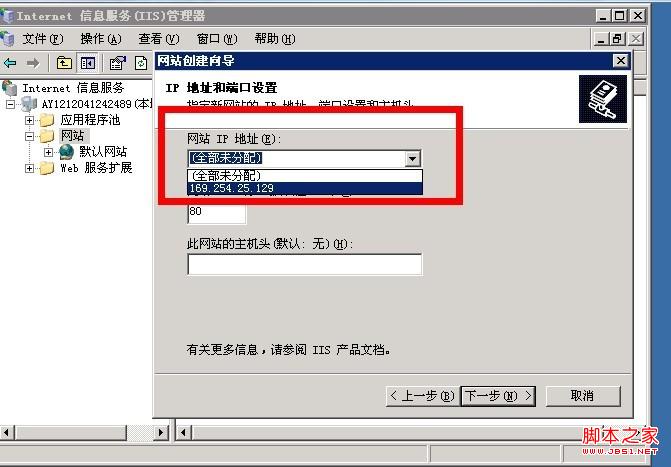
IIS 新增網站-IP 下拉選單異常

原因分析

使用者變更了電腦名稱,但登錄機碼 HKEY_LOCAL_MACHINE\SYSTEM\ControlSet001\Control\ComputerName\ActiveComputerName 中的值未同步更新,導致 IIS 綁定邏輯異常。

解決方法

  1. 執行 regedit 開啟登錄編輯器。
  2. 瀏覽至:
    HKEY_LOCAL_MACHINE\SYSTEM\ControlSet001\Control\ComputerName\ActiveComputerName
  3. 將 ComputerName 字串值修改為目前「我的電腦」→「內容」→「電腦名稱」頁面顯示的名稱。
  4. 重新開機。
  5. 再次開啟 IIS 管理員新增網站,IP 位址下拉選單應恢復正常。

登錄表修改示意

補充說明

  • 同樣情況可能發生於 ControlSet002,建議一併檢查。
  • 修改電腦名稱後,建議立即重新開機,讓系統自動同步所有相關登錄機碼,避免此類問題。
Copyright © Windows教程網 All Rights Reserved