遇到 Windows 多重開機選單消失、新驅動導致顯示異常、核心系統檔案損毀等情況,不必立即重灌。本文提供三大實用手動修復技巧,助你快速搶救系統。
從安裝光碟 I386 目錄複製 NTDETECT.COM、ntldr、bootfont.bin 至 C 槽根目錄。然後編輯 boot.ini,確保 [boot loader] 區段指向正確預設系統,[operating systems] 列出所有 OS 的正確分割區路徑與 /fastdetect 參數。
[boot loader]
timeout=30
default=multi(0)disk(0)rdisk(0)partition(1)\WINDOWS
[operating systems]
multi(0)disk(0)rdisk(0)partition(1)\WINDOWS="Microsoft Windows XP" /fastdetect
multi(0)disk(0)rdisk(0)partition(2)\WINDOWS="Microsoft Windows 2000" /fastdetect
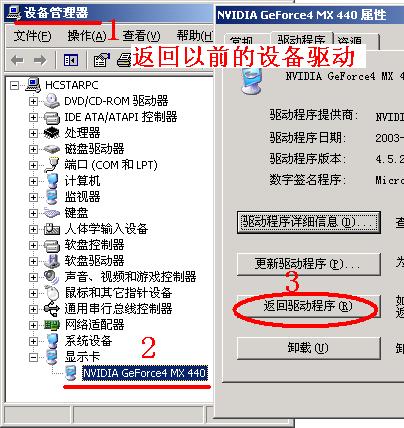
裝置管理員 → 顯示配接器 → 右鍵屬性 → 驅動程式 索引標籤 → 點擊 「回復舊版驅動程式」。重開機後圖形軟體恢復正常,適用於任何硬體裝置驅動更新後出現相容性問題的情況。

執行 sfc /scannow 立即掃描並替換所有版本不符的受保護系統檔案,或用 sfc /scanboot 設定每次開機掃描。若提示插入安裝光碟,請使用同版本(含相同 Service Pack)的原版光碟。
進階技巧: 若系統無法開機,可進入復原主控台或 WinPE 環境,手動從光碟 I386 解壓縮所需檔案(用 expand 指令)覆蓋回 C:\Windows\System32。
Windows NT 4.0 Y2K 千年蟲問題完整清單與修補方案:SP4 + MDAC 2.0 SP2 + Y2KUPD
ERD Commander 2003 解決 NT 系統啟動故障實戰:禁用錯誤驅動、恢復 NTLDR、查看事件日誌、系統還原
Windows NT 核心資源管理深度解析:GDI 物件配額、進程限制與系統總量上限
Windows NT 安全機制淺析:口令、檔案系統、Web 伺服器與 NTFS 分區防禦
Windows NT Server 網路故障診斷邏輯:從 Ping 測試到 NetBIOS/DNS 解析層層排查
Cisco Secure ACS for Windows NT 空密碼漏洞:LDAP 驗證繞過與升級修補