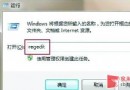
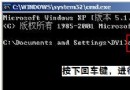
點擊開始選單後,子選單彈出明顯延遲,影響操作流暢度。其實 Windows 允許透過登錄表調整選單顯示延遲時間(預設 400 毫秒),將數值設為 0 可達到近乎瞬間彈出的效果。
regedit
HKEY_CURRENT_USER\Control Panel\Desktop
MenuShowDelay
0
設為 0 後,滑鼠游標劃過主選單項目時,子選單幾乎無延遲彈出,大幅提升操作體感速度。
隨身碟/移動硬碟檔案誤刪怎麼辦?快盤雲端回收站功能救援
將檔案隱藏在圖片中:CMD copy /b 實作教學
硬碟碎片整理的好處與迷思:提升速度、延長壽命,SSD 免整理
關閉 Windows 自動更新:從系統屬性到服務停用三級方案,前提是已裝第三方安全軟體
關機自動備份重要資料:群組原則關機腳本實作
電腦提示虛擬記憶體不足?三步驟快速調整與根因排查
Windows 小技巧:自動隱藏工作列與結束無回應程式的兩招必學
誤刪檔案免軟體救援:登錄修改恢復回收站找回檔案