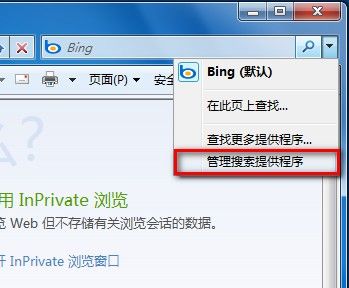
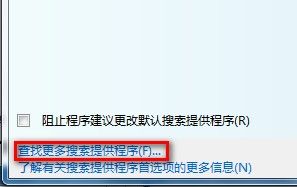
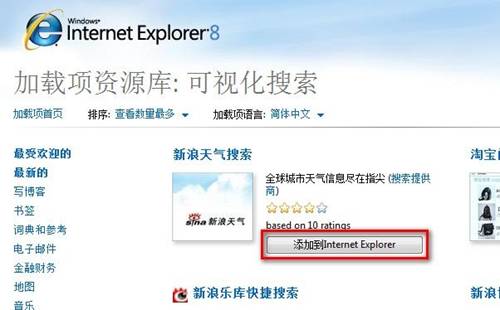
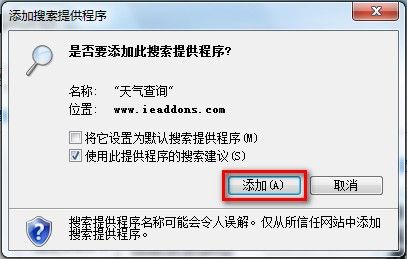
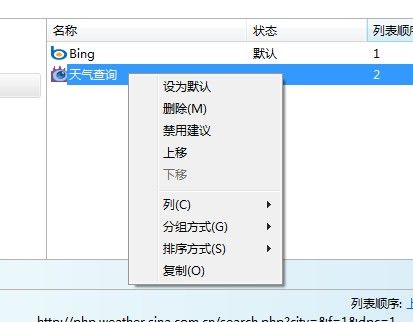
Win7 IE8 變更預設搜尋提供者:
電腦軟體升級實戰指南:從 Windows 修補程式到自動化管理工具的完整策略
Win7 設定 IE 彈出視窗攔截器攔截等級:控制台→網路與網際網路→網際網路選項→隱私權→設定→下拉選單選擇攔截等級
Windows 安全模式完整指南:八大啟動選項與實戰應用場景
安全模式三大妙用:修復故障、刪頑固檔、徹底掃毒
系統還原失敗六大原因深度解析:磁碟空間、檔案鎖定、錯誤還原點等
Windows 搜尋「漏網之魚」:開啟中的檔案竟成盲點
重灌系統後「黃金十大防護動作」:封鎖病毒入侵零時差
Windows 7 刪除所有系統還原點釋放磁碟空間教學