Windows 8/8.1 內建螢幕數字小鍵盤預設關閉,需手動喚出。若習慣使用數字鍵盤,可透過註冊表修改預設狀態,開機即自動顯示。
regedit → 確定。HKEY_USERS\.DEFAULT\Control Panel\KeyboardInitialKeyboardIndicators 字串值: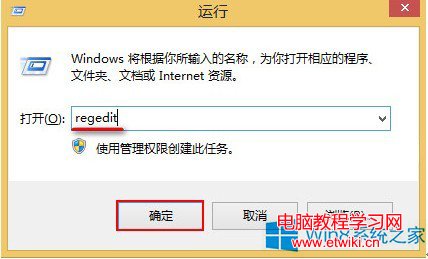
| 數值 | 行為 |
|---|---|
| 0 | 關閉所有指示燈 (NumLock/CapsLock/ScrollLock) |
| 1 | 僅 CapsLock 開啟 |
| 2 | **NumLock 開啟** (數字鍵盤啟用) |
| 3 | NumLock + CapsLock 開啟 |
| 7 | 全部開啟 |
一鍵註冊表修改,讓數字小鍵盤開機即刻就緒,提升數值輸入效率。