USB 自動播放功能雖方便,卻是 Autorun 病毒、蠕蟲傳播主要管道。透過群組原則全域停用所有磁碟機自動播放,大幅降低可移式儲存裝置感染風險。適用 Windows 7 專業版/企業版/旗艦版。
gpedit.msc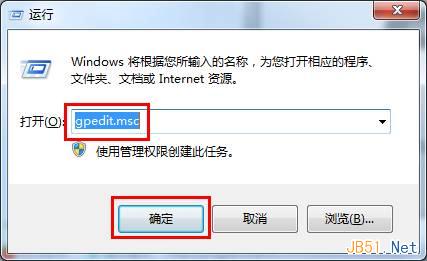
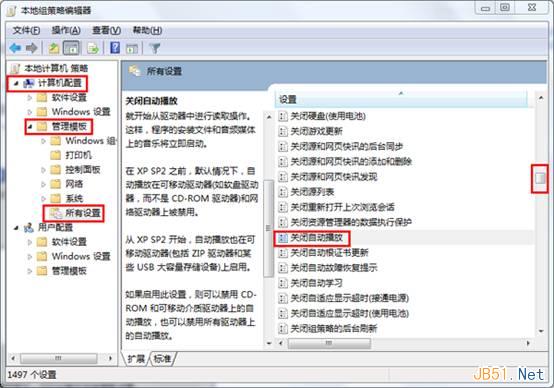
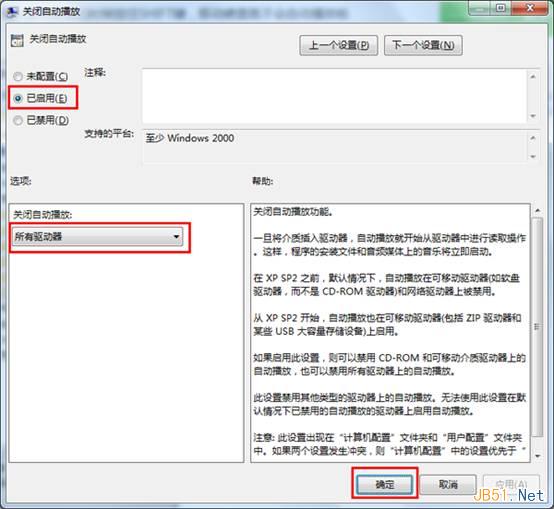
HKEY_CURRENT_USER\Software\Microsoft\Windows\CurrentVersion\Policies\Explorer\NoDriveTypeAutoRun = 0xFF (255,十六進位 FF,禁用所有磁碟機類型)設定生效後:USB 隨身碟、外接硬碟、光碟、記憶卡插入不再彈出自動播放對話框,需手動開啟「電腦」點選磁碟機存取。網路磁碟機、固態硬碟不受影響。
Win10 Mobile 安裝 Android APK 應用程式不支援功能彙總 (Project Astoria 限制)
Win10 升級至 89% 重開機後硬碟資料全失、提示「缺少作業系統」?微軟承認相容性問題
Windows 10 正式發布前迎來第三波更新補丁 KB3074674:持續修補優化
Windows Server 2016 Technical Preview 3 Build 10514 映像檔外洩,提供下載連結
SSD 固態硬碟 4K 對齊與 AHCI 檢測工具:AS SSD Benchmark 中文漢化版
Win10 Build 10056 啟用隱藏多彩主題:登錄表修改解鎖個人化色彩方案