Windows XP Windows 7 Windows 2003 Windows Vista Windows 綜合教學 Linux 系統教學
Windows 10 Windows 8 Windows 2008 Windows NT Windows Server 電腦軟體教學
您现在的位置: Windows教程網 >> Windows教程 >  >> Windows 綜合教學 >> 關於 Windows

Windows 系統無法開啟 .exe 執行檔的四種修復方法

編輯:關於 Windows

病毒或木馬常修改 .exe 檔案關聯,導致無法執行任何程式。除了重灌系統,以下提供四種不重灌的修復方案:

方法一:透過 .com/.scr 繞過限制修改登錄表

  1. 將 C:\WINDOWS\regedit.exe 重命名為 regedit.com 或 regedit.scr
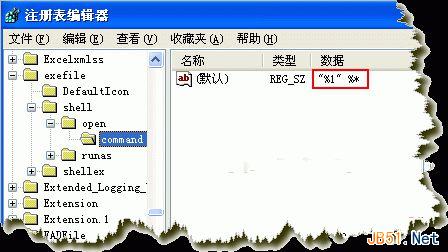
  2. 「執行」中輸入新檔名開啟登錄表編輯器
  3. 瀏覽至 HKEY_CLASSES_ROOT\exefile\shell\open\command,將值修改為 "%1" %*
  4. 將 regedit 改回原檔名

方法二:匯入 .reg 登錄檔

  1. 用記事本建立文字檔,貼上以下內容並存為 fix.reg:
regedit4
[hkey_classes_root\exefile\shell\Open\command]
@="%1" %*
  1. 雙擊匯入登錄表

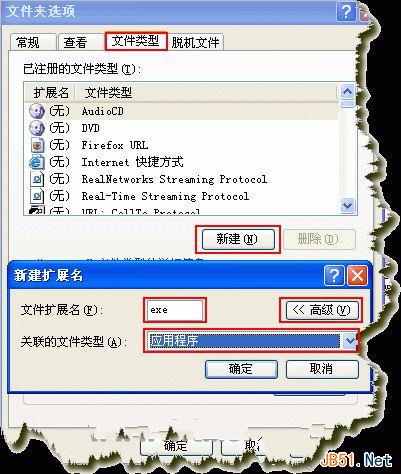
方法三:重新建立 .exe 檔案關聯

  1. 開啟「我的電腦」→「工具」→「資料夾選項」→「檔案類型」
  2. 點選「新增」,輸入副檔名 exe
  3. 點選「進階」,在「關聯的檔案類型」選擇「應用程式」

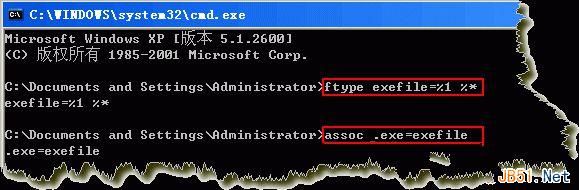
方法四:命令提示字元修復(僅適用 Windows 2000/XP)

  1. 將 C:\WINDOWS\system32\cmd.exe 重命名為 cmd.com 或 cmd.scr
  2. 「執行」輸入 cmd 開啟命令提示字元
  3. 依序執行:ftype exefile="%1" %* 和 assoc .exe=exefile
  4. 將 cmd 改回原檔名

建議優先嘗試方法一或二,成功率最高。修復完成後請立即全盤掃毒。

Copyright © Windows教程網 All Rights Reserved