Windows XP Windows 7 Windows 2003 Windows Vista Windows 綜合教學 Linux 系統教學
Windows 10 Windows 8 Windows 2008 Windows NT Windows Server 電腦軟體教學
您现在的位置: Windows教程網 >> Windows教程 >  >> Windows 綜合教學 >> 關於 Windows

Windows 開啟「顯示內容」五大法:桌面右鍵、執行指令、控制台、系統檔案、搜尋

編輯:關於 Windows

Windows「顯示內容」實際呼叫 C:\Windows\system32\desk.cpl。五種常用開啟方式:

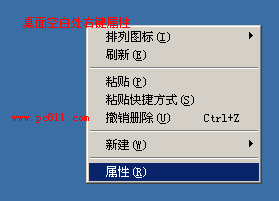
1. 桌面右鍵 → 「內容」

最直覺,適用 XP/7/8/10(10 為「顯示設定」)。

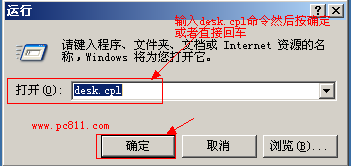
2. 執行指令 desk.cpl

Win + R → desk.cpl → Enter,跨版本通用。

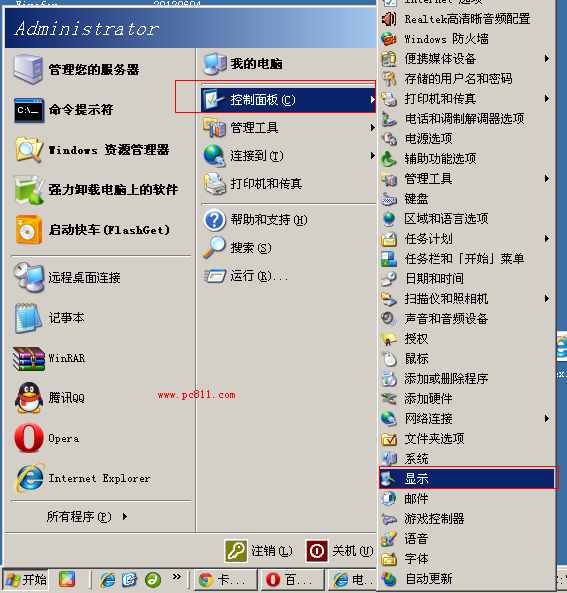
3. 控制台 → 「顯示」

開始 → 控制台 → 「顯示」(經典檢視)。

4. 系統資料夾直達

開啟 C:\Windows\system32 → 雙擊 desk.cpl。
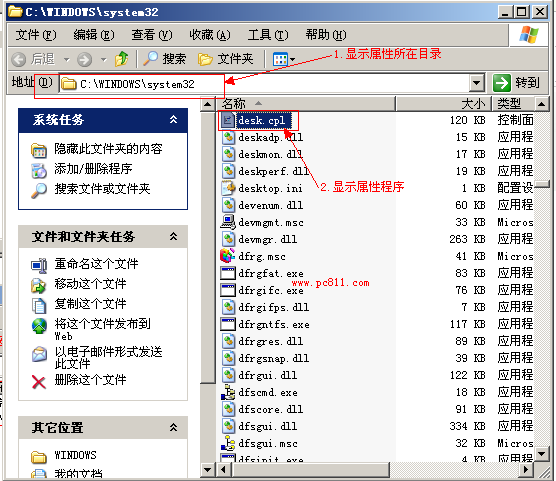
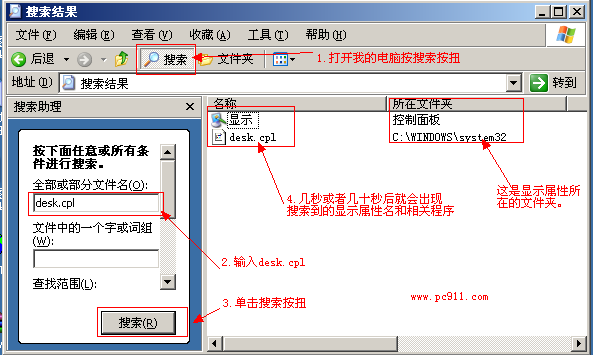
5. 搜尋 desk.cpl

全盤搜尋 desk.cpl,雙擊結果開啟。

右鍵「內容」打不開怎麼辦?

  1. 確認 desk.cpl 存在於 system32 → 若缺失,從同版本系統複製補回。
  2. 2. 檢查環境變數 Path 是否包含 %SystemRoot%\system32,修正後重試。 3. 以上正常仍無法開啟 → 進入安全模式全盤掃毒。

Copyright © Windows教程網 All Rights Reserved