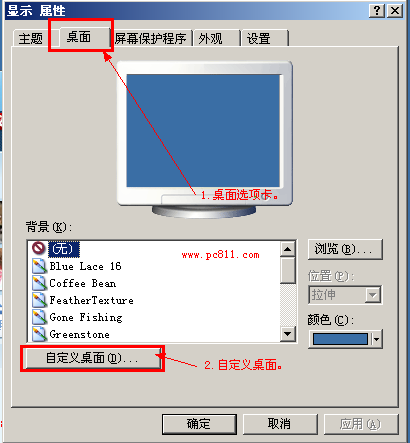
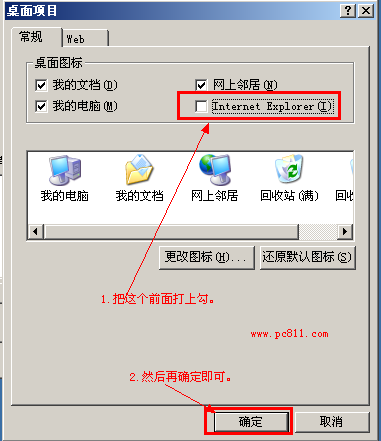
Windows XP 桌面原生 IE 圖示(非捷徑)消失,可透過「顯示內容」→「桌面」→「自訂桌面」→ 勾選「Internet Explorer」恢復。
此法同樣適用於 Windows Server 2003 等同核心系統。
釋放 C 槽空間 27 招實戰優化技巧大全
Windows 10 內建「便利貼」App 完整教學:新建、調整大小/顏色、固定工作列、隱藏/顯示切換
Win10 徹底移除 Windows Media Player 12 教學:關閉 Windows 功能法
Win10 切換帳戶出現 0x80070057 錯誤?兩大解法:強制切換用戶與網路環境排查
Win10 硬碟 100% 佔用原因與完整解決方案(詳細版)
Win10 系統下 360 瀏覽器無法開啟網頁的四大解決方案
Win10 续航实测:大多场景优于 Win8.1,但后台更新导致波动大
Win7 用 QQ 調試攝影機,免安裝廠商軟體快速預覽畫面