Win8 裝 Office 2013 後,SkyDrive Pro 2013 右鍵選單變灰無法使用。透過修改註冊表 CommandStateHandler 值可恢復主選單與子選單。
regedit → 定位 HKEY_CLASSES_ROOT\AllFilesystemObjects\shell → 找到 SPFS.ContextMenu → 右側 CommandStateHandler → 清空數值資料(原值 {573FFD05-2805-47C2-BCE0-5F19512BEB8D}) → 確定。主選單恢復啟用,但子選單仍灰。HKEY_LOCAL_MACHINE\SOFTWARE\Microsoft\Windows\CurrentVersion\Explorer\CommandStore\shell\ → 找到 4 個 SPFS. 開頭的鍵值 → 各自右側 CommandStateHandler 清空數值 → 確定。所有子選單恢復啟用。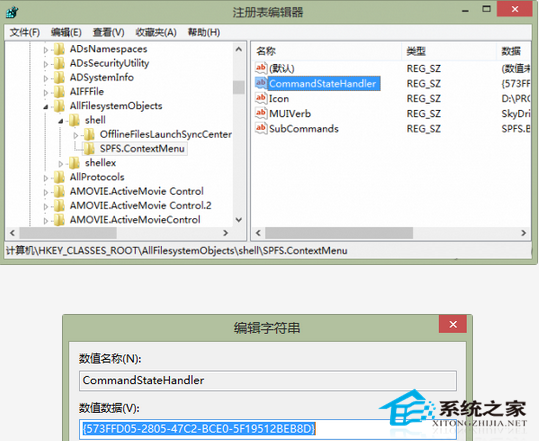
圖 1:清空 SPFS.ContextMenu 的 CommandStateHandler
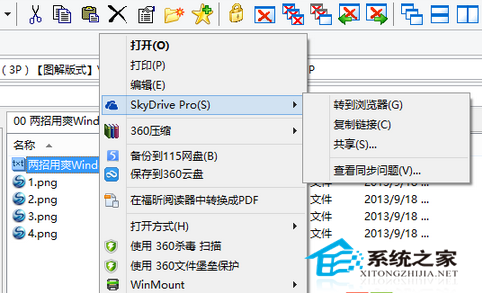
圖 2:CommandStore\shell 下 4 個 SPFS. 鍵值
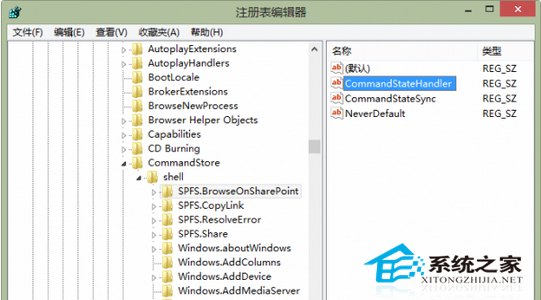
圖 3:清空各子選單 CommandStateHandler
修復後右鍵選單可快速分享、複製連結,使用體驗大幅提升。