Windows 8 程式當機時會強制彈出「連線檢查解決方案」對話框,許多用戶覺得干擾。透過修改登錄可將此行為導向傳統的「電腦管理」介面,達到取消提示效果。
regedit → 確定。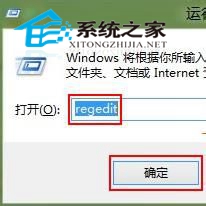
HKEY_LOCAL_MACHINE\SOFTWARE\Classes\CLSID\{20D04FE0-3AEA-1069-A2D8-08002B30309D}\shell\Manage\command。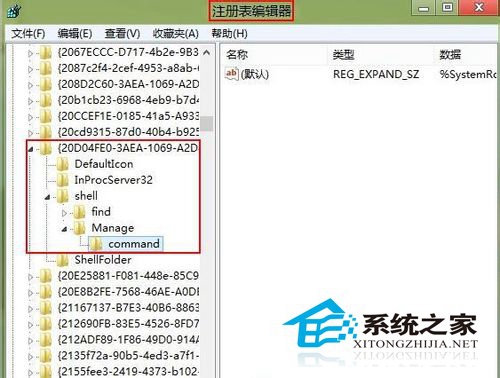
%SystemRoot%\system32\CompMgmtLauncher.exe 改為 mmc compmgmt.msc → 確定。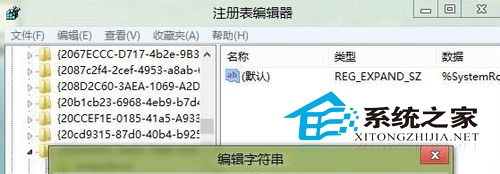
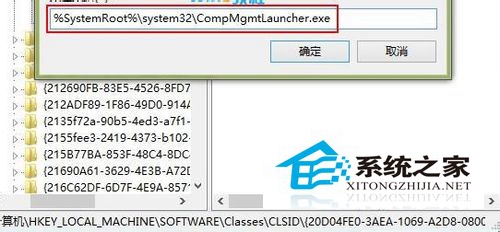
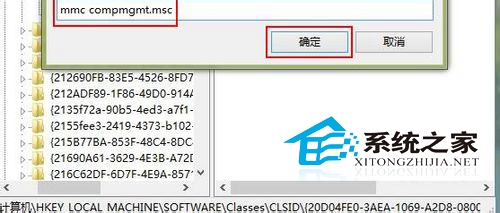
修改完成後,程式異常將不再彈出連線檢查提示,改為開啟傳統電腦管理介面,體驗更清爽。
Windows 7 登入畫面文字與按鈕樣式自訂:登錄 ButtonSet 三模式切換
Win10 10061 工作列變黑色怎麼改顏色?個人化設定調整主題色彩與透明度完整教學
Win10 Build 10532 更新內容完整彙總:右鍵選單現代化、Feedback 分享、EdgeHTML/Chakra 大幅強化
Win10 檔案總管隱藏「常用資料夾」與「最近使用的檔案」保護隱私
Win8.1 執行程式報錯 0x00000xx (應用程式無法啟動)?DirectX Repair 修復缺失元件
Win10 註冊 OCX 元件提示錯誤 0x80040200 解決方法
微軟推出 Win10 企業級安全新功能:Device Guard(裝置防護)
Win10 Mobile 10136 升級注意事項:10080 需先回滾 WP8.1、時間調整檢查更新、已知 Bug 列表