與以往透過控制台 Windows Update 不同,Build 9860 僅能在 Modern 介面取得。具體操作:
update 進入「更新設定」,或按 Win+C 開啟 Modern 設定 →「更新與復原」。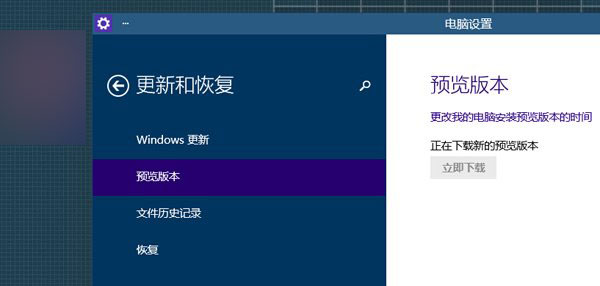
流程簡單明瞭,若控制台檢查不到更新,請務必改用 Modern 介面操作。
惠普筆電重裝 Win7 完整圖文教學:備份驅動、USB 開機鍵 F9、自訂分區格式化
Win8.1 建立 Microsoft 帳號失敗,錯誤代碼 0x800b0101 完整修復教學
Windows 7 任務列行事曆只有陽曆?用 360 安全衛士「小清新行事曆」替換支援陰曆
Win7 可移動磁碟無法開啟?掃描修復、chkdsk 指令、低階格式化三大解法
Windows XP 控制台無法開啟?群組原則解除禁止存取教學
Win10 Build 10049 隱藏細節:計算機/錄音機/鬧鐘灰白主題、我的裝置/個人化新圖示、Bio Enrollment、近期檔案刪除措辭更新