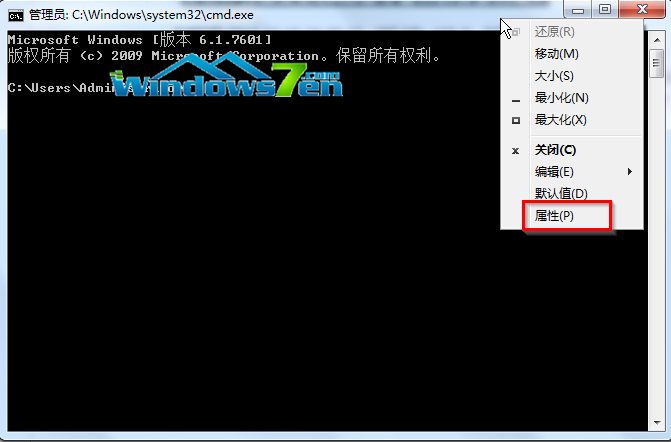
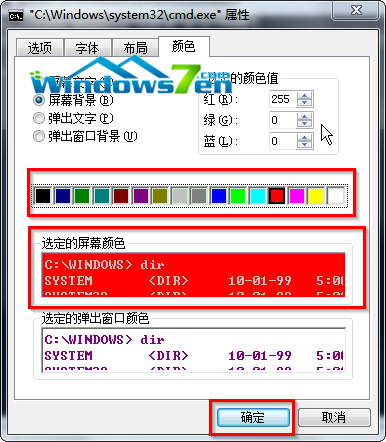
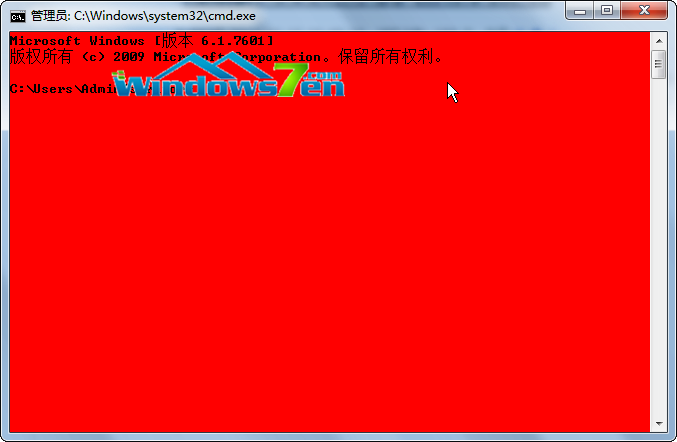
Win7 CMD 預設黑底白字缺乏個性。右鍵標題列 → 「內容」→ 「顏色」分頁 → 選擇「畫面背景」/「畫面文字」/「彈出視窗背景」/「彈出視窗文字」顏色 (如紅底黃字) → 確定即時生效。
cmd → 確定。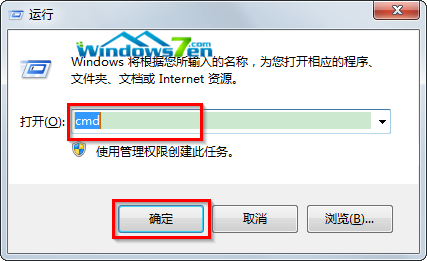
HKEY_CURRENT_USER\Console 預設值。PowerShell 同樣支援標題列右鍵修改顏色。現代 Windows Terminal (Microsoft Store 免費) 提供 JSON 設定檔、主題、分頁、Unicode/字體完整支援,強烈建議取代傳統 CMD/PowerShell 視窗。
Windows 10 開機音效消失?啟用「播放 Windows 啟動聲音」選項找回經典開機音樂
Win7/8.1/10 命令列設定靜態 IP 完整教學:netsh 指令一鍵搞定
Windows 10 正式版釋出日期成謎:Build 2015 未公布、AMD 洩露 7 月底、微軟醞釀大招?
Win7 出現 502 Bad Gateway 完整解決方案:DNS 快取、Proxy、DNS 劫持、軟體劫持
Windows 模擬藍畫面生成完整記憶體傾印,鍵盤熱鍵觸發 Crash
Win8 徹底關閉 UAC 的代價與替代方案:登錄修改法與單一程式提權技巧
Win10 手機伴侶 App 體驗:跨平台 (iOS/Android/WP) 檔案傳輸、Office 協作、音樂同步一站式管理