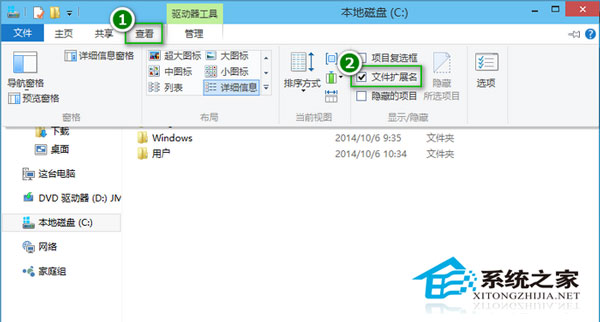
Windows 10 檔案總管(資源管理器)將「檔案副檔名」顯示切換移至「檢視」索引標籤最顯眼位置,不再需要深入「資料夾選項」對話盒,大幅提升修改副檔名的效率。
Win10 TH2 貼心更新:右鍵選單新增「使用 Windows Defender 掃描」功能
Win10 Mobile 正式版官方下載時間:9 月底釋出,運營商測試可能延後
Win10 正式版 1511 (TH2) 簡體中文 ISO 鏡像下載(32/64 位)+ 小馬激活教學
Windows 8 家庭組功能使用教程:建立共享、修改高級設置
Windows 7 設定 IIS 7 解決 HTTP 404.3 錯誤 (安裝伺服器端包含功能)
Win7 桌面新增便利貼(Sticky Notes)兩大方法:小工具版與附件版
Win7 瀏覽器彈出「Adobe Flash Player 已停止運作」解決:關閉 Flash 保護模式 ProtectedMode=0