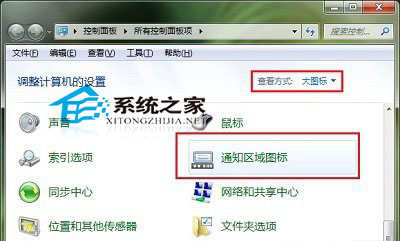
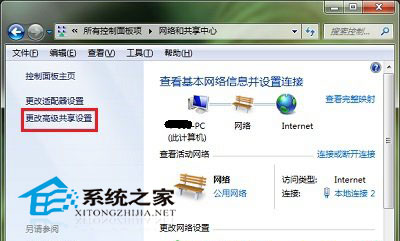
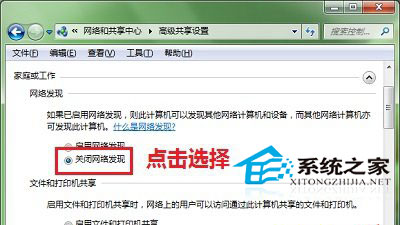
Win10 網路位置預設顯示區域網路所有裝置,若不想被發現或看不到其他裝置,可關閉「網路探索」功能。
操作方法(Win7/8/10 通用):
關閉網路探索同時也能提升公共網路環境下的安全性。
Win10 10547 更新後 Office Excel 無法關閉?停用硬體圖形加速修復
Windows 7 讓 QQ 主面板自動隱藏不衝突:三種解決方案
Win7 安裝 Windows Virtual PC 與 XP Mode 完整圖文教學
Win10 升級後降級選項不可用怎麼辦?Windows.old 已失效的解決方案
Windows 10 相簿應用首度曝光:照片增強效果驚人
Windows 10 鎖畫面高畫質壁紙完整合集下載(含儲存路徑與安裝教學)
Win10 資料夾不自動重新整理?登錄檔新增 UpdateMode DWORD=0 強制啟用自動刷新
Windows 10 正式版安裝包下載位置與免費升級詳解