Windows 8 引入 Win+PrtSc 全螢幕截圖自動存檔功能,但預設儲存路徑為 圖片\截圖 資料夾。透過修改登錄檔 ScreenshotIndex 值,可讓截圖直接存到桌面,方便即時取用。
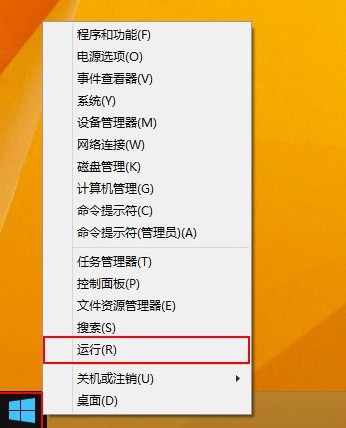
regedit 開啟登錄編輯器。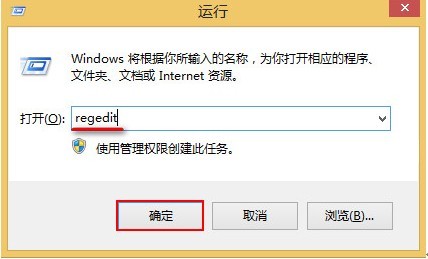
HKEY_CURRENT_USER\Software\Microsoft\Windows\CurrentVersion\ExplorerScreenshotIndex(若無則新建 DWORD 值)。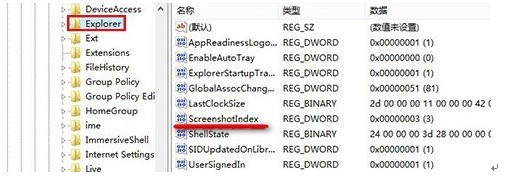
1 → 確定。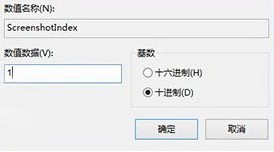
設定完成後,按 Win+PrtSc 螢幕會瞬間變暗一次,截圖以 截圖 (n).png 格式直接儲存於桌面,檔名編號自動遞增。注意:此功能僅支援全螢幕截圖,不支援作用中視窗截圖(Alt+PrtSc 仍僅存剪貼簿)。
Win7 筆電開機跳出 atibtmon.exe 錯誤?電源選項切換「最大效能」模式徹底解決
Windows Server 2003 今年 7 月停止支援,微軟呼籲遷移至 Server 2012 R2/Azure/Office 365
VPN 錯誤 769「無法連線到指定目標」10 大排除方案完整清單
Win10 Mobile RedStone 預覽版 14267 更新內容彙總(持續更新)
Win7 修改預設安裝路徑 (Program Files) 導致系統軟體無法執行?複製原目錄檔案至新路徑修復