透過建立捷徑指向 rundll32.exe powrprof.dll,SetSuspendState 0,1,0,再指定熱鍵(如 Ctrl+Alt+F10),即可讓任何鍵盤擁有休眠熱鍵。
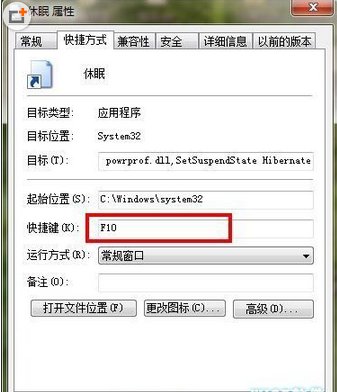
進階應用:集中多個系統捷徑於資料夾,配合 IconPackager 美化為啟動列按鈕,實現鍵盤全控電腦。
Win10 Mobile 10572 升級後 QQ/微信/微博無法發送圖片,建議暫緩更新
微軟修改 Win10 激活規則:重裝系統無需金鑰 雲端自動驗證
Win7 安裝 MSI 出現「無法存取 Windows Installer 服務」?刪除註冊表 DisabledSessions 解決
Windows 7 vs Windows 10 多工作業切換體驗對比:Alt+Tab 與任務檢視
Win7 將使用者帳戶提升為最高權限:啟用 Administrator 並取得 TrustedInstaller 權限
Win10 Mobile 不支援 4GB 手機:安裝需佔用 5GB 儲存空間,Lumia 530 等機型恐無緣升級