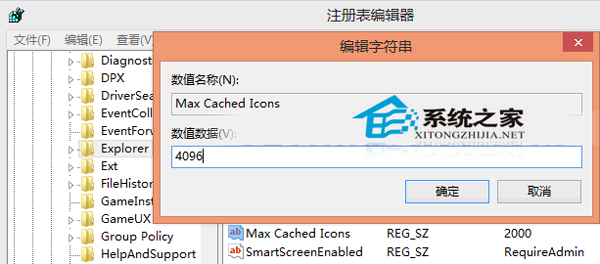
Windows 桌面放置大量捷徑/檔案時,開機/重新整理圖示顯示緩慢。透過註冊表擴大圖示快取上限(Max Cached Icons),可顯著加速圖示渲染。
Max Cached Icons
regedit
HKEY_LOCAL_MACHINE\SOFTWARE\Microsoft\Windows\CurrentVersion\Explorer
4096
8192
explorer.exe
Windows 7 關閉 UAC (使用者帳戶控制) 完整三法:系統組態、指令、註冊表
Win10 Build 10049 ISO 鏡像下載連結:內建 Spartan 瀏覽器、保留 IE11 相容舊網頁
Win8 筆電攝影機無法使用?Lenovo Settings 改為「正常」模式修復
透過群組原則或批次檔禁止修改區域網路 IP 位址
Windows 8 雙顯示卡開機黑屏?停用核心顯示卡解決
Windows 10 Build 10151 中文 ISO 下載與多圖預覽
Windows 10 家庭版/專業版零售價正式公布:最低約人民幣 737 元
Win7 更改 CMD 命令提示字元視窗背景顏色:屬性→顏色分頁自訂