Windows XP Windows 7 Windows 2003 Windows Vista Windows 綜合教學 Linux 系統教學
Windows 10 Windows 8 Windows 2008 Windows NT Windows Server 電腦軟體教學
您现在的位置: Windows教程網 >> Windows教程 >  >> Windows 綜合教學 >> 關於 Windows

Win8.1 休眠檔 hiberfil.sys 佔用大量 C 槽空間?一行指令永久刪除停用休眠

編輯:關於 Windows

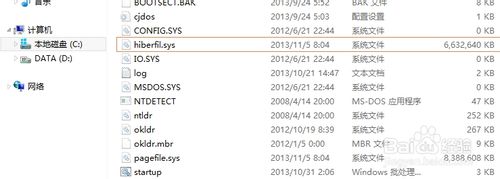
休眠功能會將記憶體內容寫入 hiberfil.sys,檔案大小等同實體記憶體容量(如 8GB RAM → 8GB 檔案)。現代電腦記憶體較大,休眠喚醒速度不如睡眠/快速啟動,建議停用休眠釋放 C 槽空間。

停用休眠指令(需管理員權限)

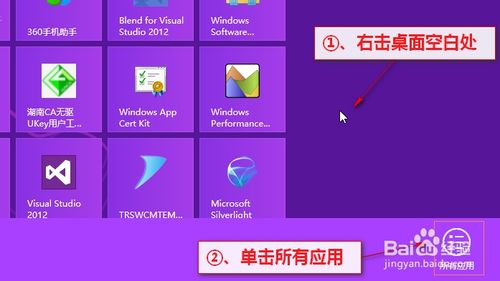
  1. 開始畫面右鍵空白處 →「所有應用程式」。
  2. 找到「命令提示字元」右鍵 →「以系統管理員身分執行」。
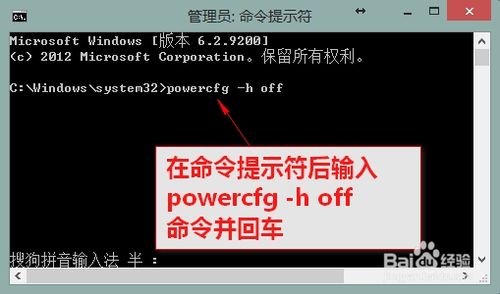
  3. 輸入:powercfg -h off 按 Enter。
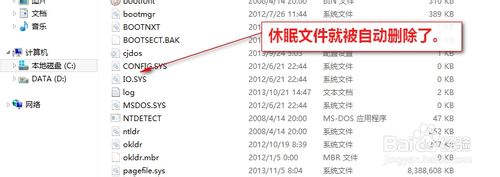
  4. 重新整理 C 槽根目錄,hiberfil.sys 即自動刪除。

hiberfil.sys 佔用 6GB 空間

所有應用程式選單

命令提示字元以管理員執行

輸入 powercfg -h off

休眠檔已刪除

補充說明

  • 必須以管理員身分執行 CMD,否則會提示「找不到命令」。
  • 停用休眠後,「睡眠」功能不受影響(睡眠僅斷電非必要裝置,資料留在記憶體)。
  • 若需重新啟用:powercfg -h on。
  • 同樣適用於 Win7/Win10。
Copyright © Windows教程網 All Rights Reserved