MBR 轉 GPT 可支援 >2TB 硬碟、配合 UEFI 啟動更快。操作前請確認主機板支援 UEFI,並備份資料(轉換後可能藍畫面)。
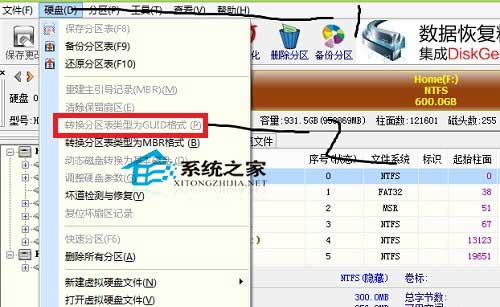
截圖中選項呈灰色不可選,因已轉換成功。未轉換前該選項可點選。轉換後需重新安裝 UEFI 模式系統。
Win10 Mobile 10536.1004 快速版開始推送:雙軌升級路徑 (10514 過渡版 + 10536 最新版)、電量 40% 以上、Wi-Fi 下載
U盤安裝 Windows 10 完整教學:使用「U當家」輕鬆打造開機隨身碟
雙系統電腦設定 Win8.1 為預設開機系統,免去每次選單等待
Win10 Mobile/PC/HoloLens 週年更新 14389 曝光:內部測試中,編譯日期 7/11
經典紙牌遊戲回歸 Windows 10,更多經典遊戲或將跟進
Win10/WP8.1 微軟帳戶恢復代碼重要性:帳戶被盜/鎖定時的最後救命稻草
Win10 PC RS2 Build 14926 已知問題與解決方法彙總:VirtualBox 崩潰、選用功能失效、計算機/鬧鐘不可用、方向鍵無法導航