XP 開機每次執行磁碟掃描 (chkdsk) 嚴重拖慢開機。透過登錄檔清除自動掃描指令可禁止:
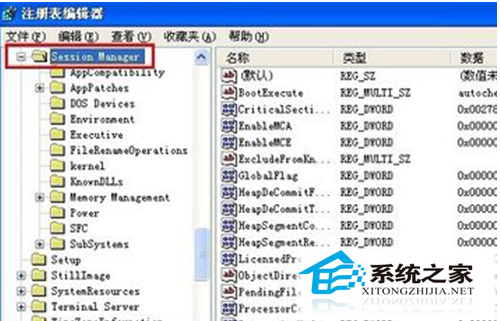
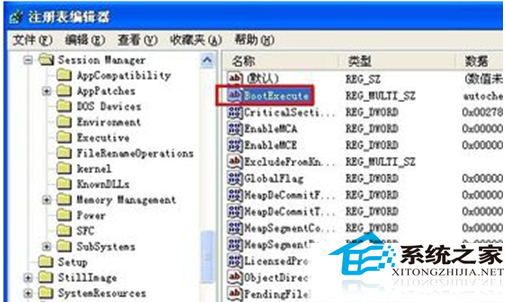
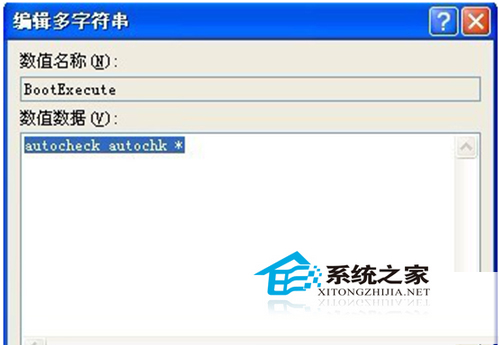
regedit,定位 HKEY_LOCAL_MACHINE\SYSTEM\CurrentControlSet\Control\Session Manager。BootExecute,清空數值資料 (原為 autocheck autochk *),確定。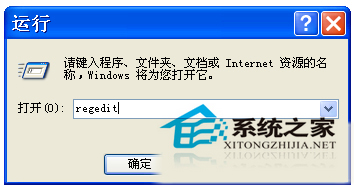
注意:此舉僅禁止開機自動掃描,磁碟錯誤仍需手動執行 chkdsk /f 修復。建議先備份登錄檔。
Surface 應用更新:針對 Win10 優化 UI、修復 Surface Pro 3 筆輸入與 OneNote 啟動問題
Win10 Build 986x 變革:Charms 欄網路功能改為獨立視窗,提供更多 Wi-Fi 選項、熱點列表與 VPN 控制
Win10 自訂鎖定畫面背景圖片教學:設定介面上傳個人化照片
Firefox Win10 版怎麼樣?Mozilla 宣布開發避免 Edge 一枝獨秀
Win10 應用圖示灰色無法點擊/閃退?清除 Windows Store 快取、重置 Store 服務、SFC 修復六大方案