Windows 8.1 64 位元環境下直接執行 iTunes 11 安裝程式常會報錯並回滾,錯誤代碼多為「安裝程式遇到錯誤」。核心原因是舊版安裝程式未正確識別 Win8.1 環境,導致權限檢查與相容性判斷失敗。
解決方案:設定相容模式為 Windows 7 + 以管理員身分執行
- 找到 iTunes 11 安裝程式(
iTunesSetup.exe 或 iTunes64Setup.exe)。
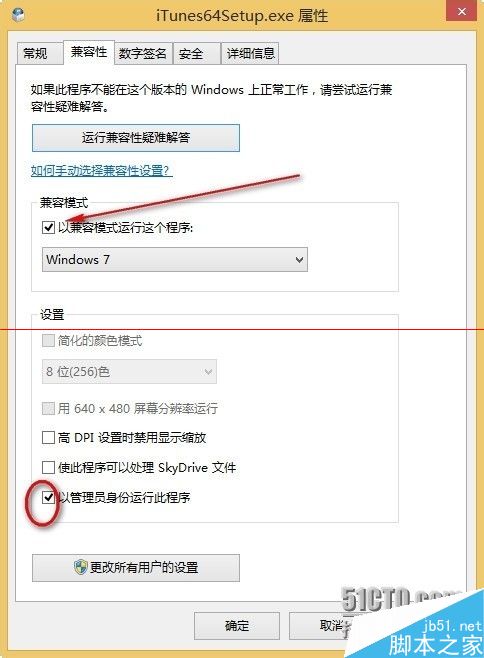
- 右鍵 → 「內容」 → 「相容性」分頁。
- 勾選「以相容模式執行這個程式」 → 下拉選單選擇 Windows 7。
- 勾選「以系統管理員身分執行這個程式」。
- 「套用」→「確定」。
加強權限(雙重保險)
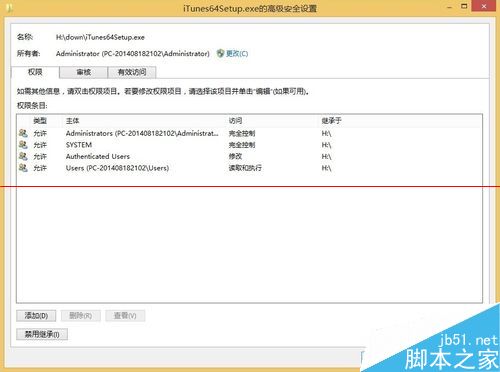
- 同一「內容」視窗 → 「安全性」分頁 → 「編輯」。
- 選取目前登入使用者帳戶(或 Administrators 群組) → 勾選「完全控制」所有權限 → 「確定」。
驗證結果
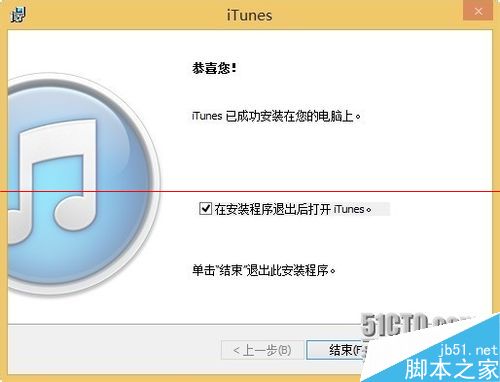
再次執行安裝程式,應可順利完成安裝,不再出現回滾錯誤。
避坑指南
- 必須使用 64 位元版 iTunes(檔名含
64),32 位元版在 Win8.1 x64 上同樣會失敗。
- 建議直接下載最新版 iTunes(目前已迭代至 12.x/13.x),舊版 11.x 已停止安全更新,且與新版 iOS 裝置相容性較差。
- 若仍失敗,嘗試停用防毒軟體即時掃描、清理
%TEMP% 暫存檔後重試。