Windows 10 技術預覽版 Build 9926 正式發布,若想取得官方原版 ISO 進行乾淨安裝,可透過知名資源站「MSDN I Tell You」(itellyou.cn)下載。以下為詳細圖文步驟。
下載流程
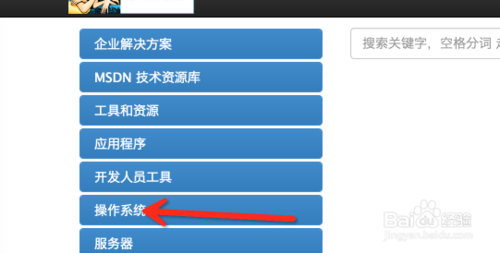
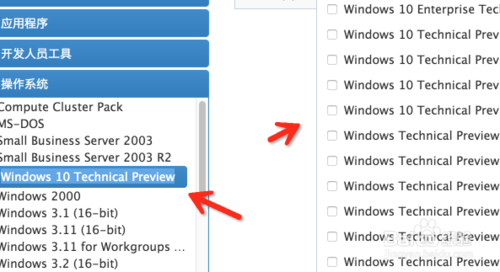
- 進入 MSDN I Tell You 官網,左側選單選擇「作業系統」。
- 在列表中找到「Windows 10 Technical Preview」並點擊。
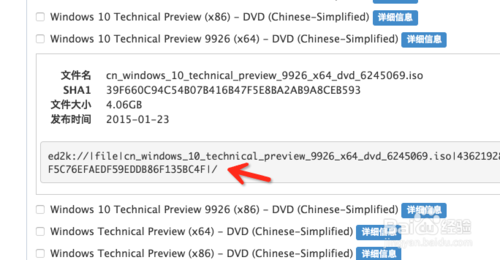
- 右側頁面會顯示各版本資訊,選擇 Build 9926,並確認所需架構(32 位元 x86 或 64 位元 x64)。
- 複製該版本的下載連結(通常為 ed2k 磁力連結)。
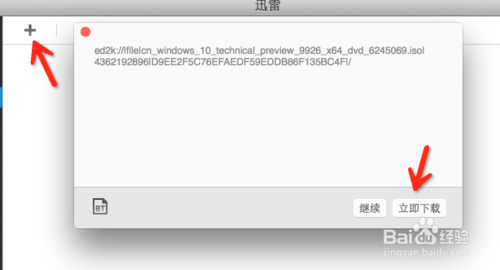
- 開啟迅雷等支援磁力連結的下載工具,新增任務並貼上連結開始下載。
提示:ISO 檔案約 3~4 GB,請確保磁碟空間足夠,建議使用支援斷點續傳的下載軟體。