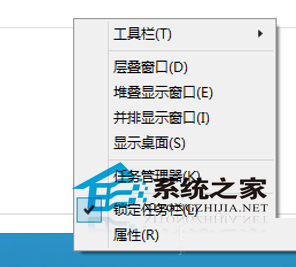
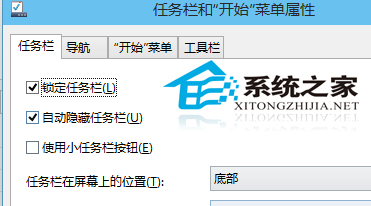
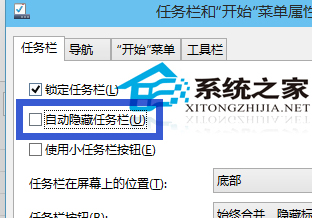
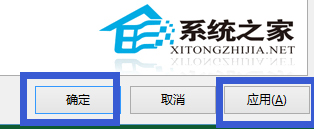
Win10 工作列因設定會自動隱藏,需將滑鼠移至螢幕底部才顯示。解決:
注意:「鎖定工作列」勾選不可取消,否則工作列可能跑到螢幕左右邊難以操作。
Windows 10 一鍵建立還原點:建立捷徑「以管理員身分執行」完整教學
微軟延長 Windows 7/8.1 認證考試截止日期至 2016 年 7 月 31 日:因應企業遷移緩慢、認證專家需求持續
Win8.1 升級 Win10 錯誤 80240020/80070057 解決:清除更新快取 + DISM 修復系統檔案
XP 單一資料夾快速掃毒:360 右鍵選單「木馬雲查殺」
Windows 8 尚未普及 Windows 9 即將登場:微軟加速釋出節奏回顧
Win7 安裝金山毒霸提示「安裝引擎失敗,不支援此介面」解決方案:衝突源為 ACDSee 迷你版
Win10 鎖定畫面設定完整教學:Windows 預設、自訂圖片、幻燈片放映三模式切換
Win7 磁碟出現 .crdownload 檔案能刪除嗎?Chrome 下載暫存檔,視情況清理