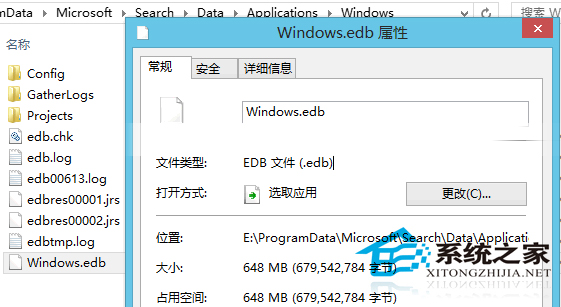
Windows 搜尋依賴 Windows.edb 索引資料庫,預設位於 C:\ProgramData\Microsoft\Search\Data\Applications\Windows。隨時間增長,此檔常達數百 MB 甚至數 GB,嚴重擠佔系統碟空間。本文教您安全移動至其他分割區。

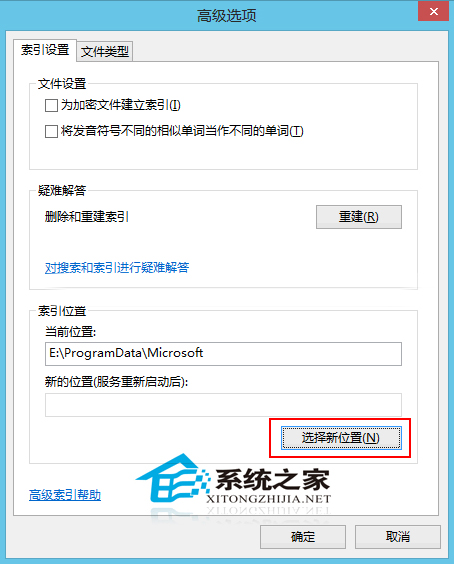
遷移後,C 槽將釋放相應空間,系統運作更輕盈。若完全不需搜尋功能,可於「服務」中停用「Windows Search」並刪除索引檔,但將失去即時搜尋便利性。
Win10 安裝量破 3 億!免費升級剩 84 天(7/29 截止)
Win10 預覽版 10022 下載地址與官方 ISO 獲取說明
聯想 Y485P 升級 Win8.1 無線網卡受限/斷線?更換相容驅動解決
Windows 7 遊戲無法全螢幕解決方案:修改登錄表 Scaling 參數或顯示卡控制面板設定縮放模式
Win10 Mobile 預覽版 14383 更新內容:修復問題與已知 Bug 總覽
Win7 移動硬碟不顯示盤符怎麼辦?三招:啟用 USB 大容量儲存、磁碟管理指派新磁碟代號、檢查硬體