Win8.1 Windows Update 失敗顯示錯誤碼 80246010,常因網路擁塞、防毒軟體干擾、系統檔損壞或更新元件異常。試試以下建議:
先更新防毒軟體病毒碼,再執行 Windows Update。若用 MSE/Defender,請在其獨立介面更新病毒碼後再更新系統。
參考《Windows 8 如何自訂更新部分修補程式》,從 Microsoft Update Catalog 下載對應 KB 號套件安裝,避開線上更新錯誤。
選擇午休或清晨等網路負載低時段更新,下載成功率較高。
精簡版移除關鍵元件導致更新失敗,唯有重裝原版系統徹底解決。
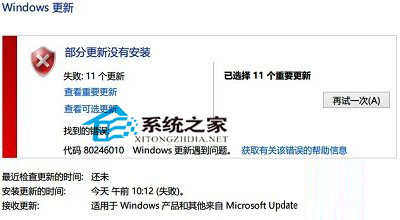
遇到更新錯誤勿慌,依錯誤碼查詢對應對策,多半能解決。
Win7 安装“逐鹿工具箱”报错“error launching installer”解决:统一系统区域语言为中文
Classic Shell 讓 Windows 8 找回經典開始選單 + 工具列替代方案
盜版 Windows XP/7/8/8.1 免費升級 Windows 10 免激活直接用
Win10 無法刪除檔案提示權限不足?取得完整控制權限或變更擁有者強制刪除
Win10 「快速存取」洩露隱私?登錄檔修改徹底隱藏或恢復傳統「這台電腦」預設
Win7 系統透過群組原則停用 NetMeeting 白板程式
Win10 無法喚喚小冰/小冰打不開?開啟定位功能並登入 Microsoft 帳戶
微軟 Windows 10 Mobile/PC 通用版「114 查號」App 正式上架商店:整合撥號器、8000 萬號碼查詢、快遞追蹤、免費下載