Win10 9926 通知中心訊息持續彈出干擾,右鍵只能暫時隱藏 (1/3/8 小時)。永久關閉需改登錄:① Win+R → regedit;② 定位 HKEY_LOCAL_MACHINE\Software\Microsoft\Windows\CurrentVersion\ImmersiveShell;③ 雙擊 UseActionCenterExperience → 數值改 0;④ 重啟 explorer.exe (可用軟媒魔方快捷指令)。修改後通知中心恢復 9879 版舊樣式,訊息不再彈出,但快速設定等新功能也會消失。若需恢復,將值改回 1 或還原登錄備份。
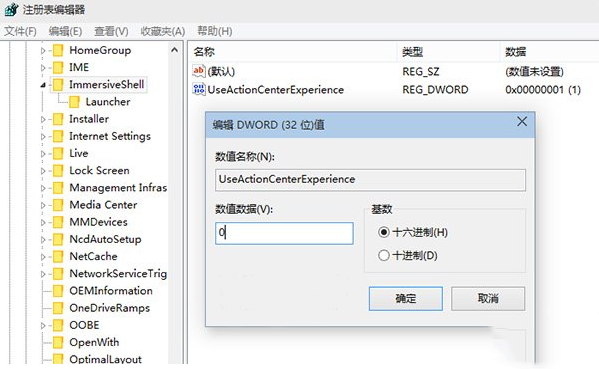
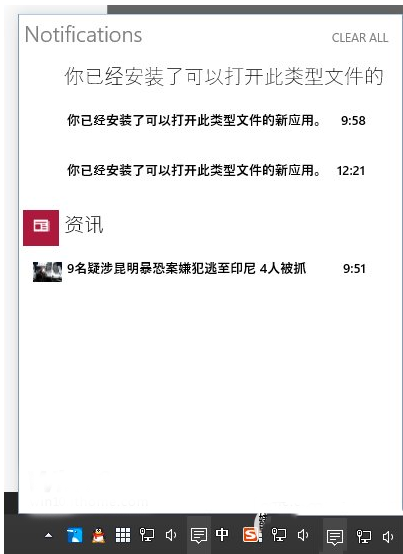
登錄層級高於介面設定,能徹底封殺彈出訊息,適合追求極致安靜的用戶。
Win10 瀏覽器能上網但應用無法聯網?一條命令重置 Winsock 目錄秒修復
Win7 內建 sxstrace.exe 診斷 Side-by-Side 組件錯誤,完整圖文教學
Win10 螢幕亮度自適應怎麼開關?電源選項與感測器服務雙重控制
Win10 系統第三方瀏覽器裝哪款最合適?2345、360、QQ、UC、百度、金山、搜狗七款參數對比與優缺點分析
Windows 7 解決無法建立還原點:啟用系統保護並手動建立
Win7/Win8/Win8.1 升級安裝 Win10 圖文教學:虛擬光碟掛載 ISO、保留檔案升級、安裝後清理 windows.old