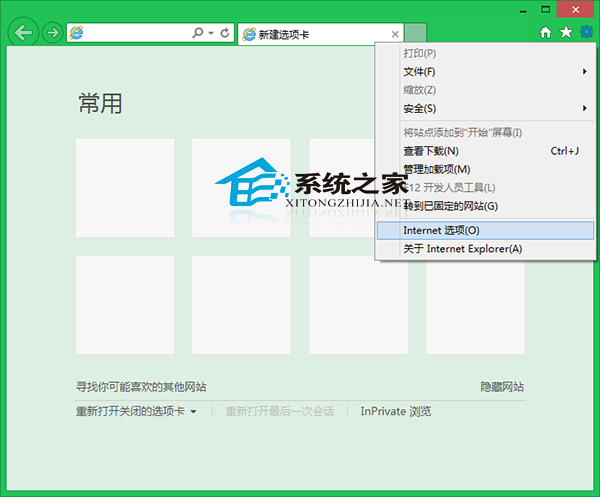
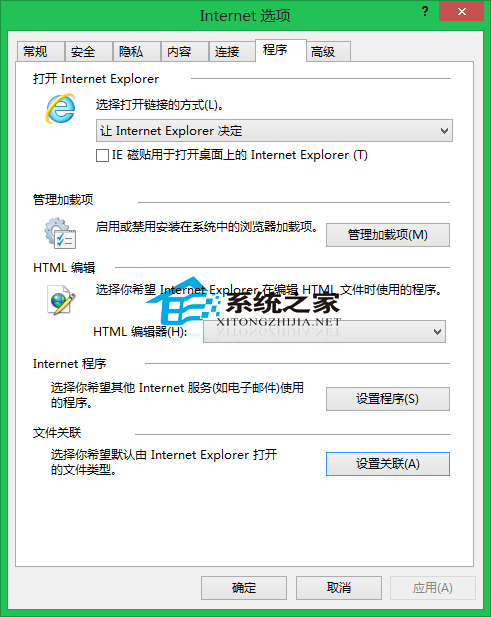
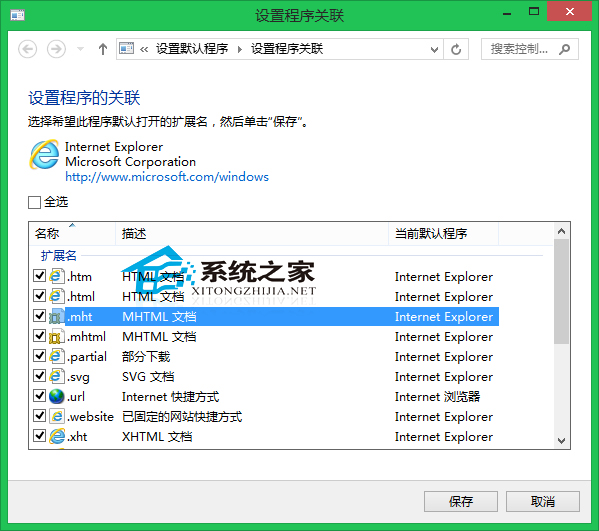
Win8 IE 預設可能未關聯 .mht (MHTML) 檔案。修復:IE →「網際網路選項」→「程式」索引標籤 →「設定關聯」→ 勾選 .mht → 確定。設定後所有採用 IE 核心的瀏覽器皆可開啟 .mht。
四步驟完成關聯,同核心瀏覽器(如 360 安全瀏覽器、傲遊等)同步生效,無需重複設定。
Win7 升級 BIOS 失敗提示 Insufficient memory 怎麼辦?調整 Video BIOS Cacheable 解決
Windows 7 照片檢視器支援 GIF 動畫播放設定教學
Win8 開啟 CBox 提示「未能連接到網路」八大解決方案全攻略
Win10添加輸入法完整圖文教程:從控制面板到語言設置一步到位
Windows 7 區域連線被停用無法上網?兩種方法快速啟用網卡
Win10 如何關閉應用商店自動更新?三步驟關閉背景下載
Win10 控制台顯示所有項目 (大/小圖示) 兩大速查法:位址列下拉選單與檢視方式切換
Win10 喇叭圖示出現紅叉提示「未安裝任何音訊輸出裝置」怎麼辦?