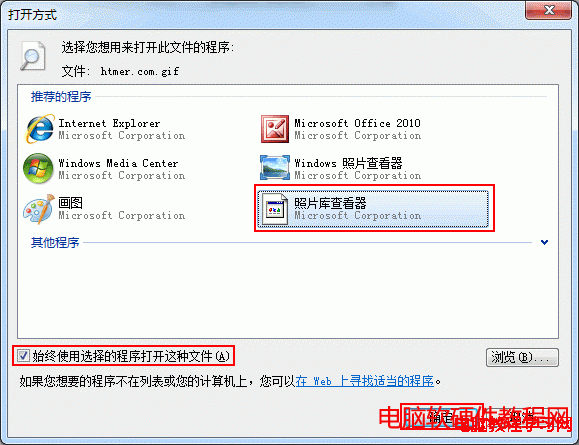
Windows 7 內建照片檢視器預設不支援 GIF 動畫播放,雙擊僅顯示靜態首幀。安裝 Image Viewer for Windows 並設定檔案關聯,即可讓照片檢視器直接播放 GIF 動畫。
設定完成後,雙擊 GIF 檔即可在照片檢視器中直接播放動畫,無需另開瀏覽器。
Win10 快速鍵補充:視窗貼齊、工作檢視、虛擬桌面、開始選單鍵盤導航
Win10 遠端桌面連線緩慢卡頓?一行 CMD 指令關閉 TCP 自動調諧解決
Win8.1 Wi-Fi 顯示「受限」無法上網?取消無線網卡「允許電腦關閉裝置省電」徹底解決
Win10 更新失敗提示「臨時需要 0.00 MB 空間」?擴充系統盤容量解決
Win7 開啟檔案提示「參考了一個無法使用的位置」?修改登錄檔使用者資料夾路徑
Windows 10 快速啟動功能開啟教學:修改登錄縮短應用程式啟動延遲
Win10 另類升級技巧:複製 $Windows.~BT 到非系統盤運行 setupprep 安裝
Win10 善用內建「便箋」與「日記本」應付工作記錄需求