Windows 8 將傳統「工作列屬性」更名為「工作列及導覽屬性」,新手常找不到入口。其實只要在工作列空白處右鍵選擇「屬性」即可直達。
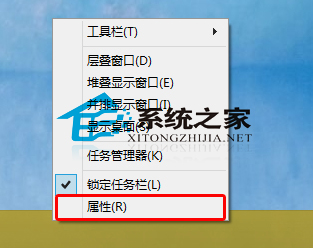
若工作列已設為「自動隱藏」,需先將滑鼠移至螢幕底緣喚出工作列,再進行右鍵操作。建議關閉自動隱藏,方便隨時存取常用功能。
Win10 開啟新舊版使用者帳戶管理:設定 App 新介面 vs 控制台舊介面雙軌並存
升級 Win8.1 點擊 Setup.exe 提示「不支援此升級路徑」解決方法
Windows 7 如何升級到 Windows 10?官方預覽版升級完整 14 步驟圖文教學
Win7 登入畫面自訂文字與標題:本地安全性原則 secpol.msc 設定
Win7 無線網路圖示消失?登錄表清除 IconStreams 快速恢復
用戶最期待 Win10 的 10 大功能:檔案總管標籤、Windows Update 一站式驅動、波斯曆、Aero Glass 回歸等