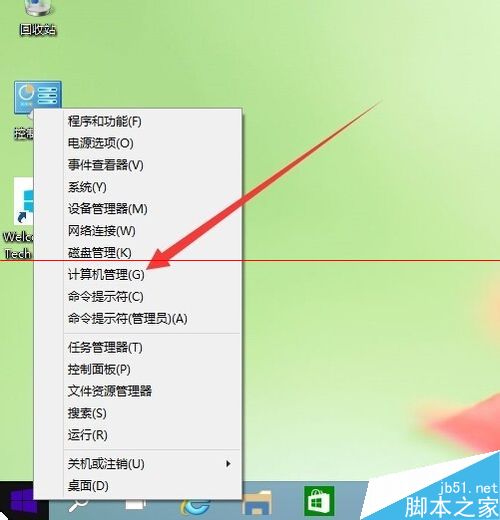
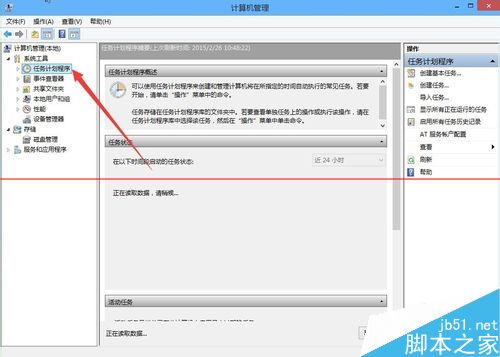
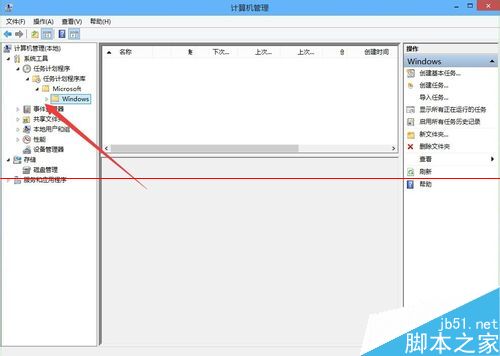
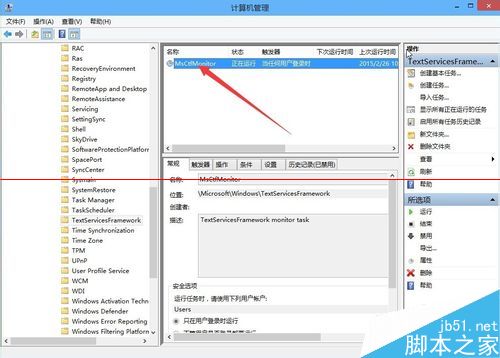
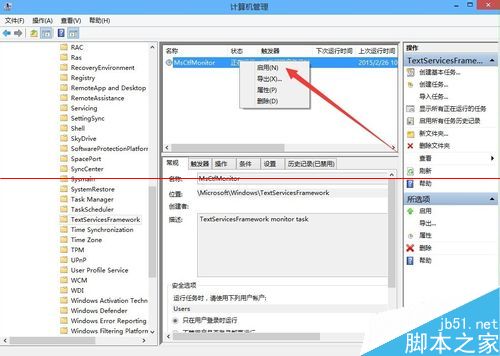
Windows 10 使用一段時間後,右下角輸入法圖標顯示「IME 已停用」,導致無法呼叫中文輸入法。這是因為負責啟動輸入法的排程工作「MsCtfMonitor」未正常執行。透過工作排程器啟用它即可解決。
原理說明: MsCtfMonitor 是 Windows 10 啟動後載入輸入法指示器的排程任務。若此任務被禁用或未執行,輸入法圖標即會顯示「已停用」。手動啟用該任務即可恢復正常。
微軟開始推送 Win10 預覽版 10565 至慢速通道
Win10 正式版漏洞频出:开始菜单快捷方式超 512 个导致崩溃,微软紧急修复中
Windows 10 寬帶連線錯誤 813 根治方案:關機批次檔自動斷線再關機
Windows 10 開始選單寬度與高度自由調整教學:滑鼠拖曳邊緣即可自訂大小,升級與全新安裝預設佈局不同
Win10 正式版如何更換捷徑圖示?內建圖示庫與自訂 .ico 檔案教學
Windows 7 網路探索功能與安全性設定完整解析
Windows 8 設定顯示所有檔案副檔名教學
Win7 找不到 DVD 光碟機驅動程式?刪除 UpperFilters/LowerFilters 修復 Code 52 錯誤