Windows XP Windows 7 Windows 2003 Windows Vista Windows 綜合教學 Linux 系統教學
Windows 10 Windows 8 Windows 2008 Windows NT Windows Server 電腦軟體教學
您现在的位置: Windows教程網 >> Windows教程 >  >> Windows 綜合教學 >> 關於 Windows

Win8.1/Win10 登入畫面預設開啟數字鍵盤鎖定,兩法任選

編輯:關於 Windows

登入畫面數字鍵盤未預設開啟,每次需手動按 NumLock 麻煩。兩種永久啟用法:

法一:重開機記憶法(最簡單)

登入畫面手動開啟 NumLock → 點右下角電源 → 選「重新開機」。後續登入畫面即會預設開啟。

法二:登錄表強制法(法一無效時)

  1. Win+R 輸入 regedit 開啟登錄編輯器。
  2. 定位 HKEY_USERS\.DEFAULT\Control Panel\Keyboard。
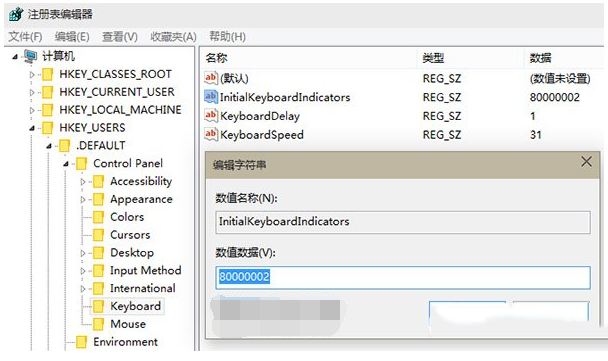
  3. 修改 InitialKeyboardIndicators 數值:
    • Win7:2
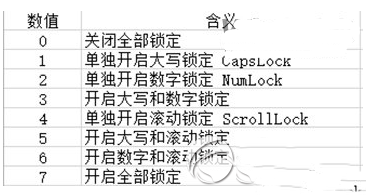
    • Win8/8.1/10:80000002(格式為 8000000x,x 為下表對應值)
  4. 確定 → 重開機生效。

數值對照表

數值效果
0全部關閉
1Caps Lock 開啟
2Num Lock 開啟
3Caps+Num 開啟

建議修改前用「軟媒魔方」備份登錄表。需恢復預設時將值改回 0 或還原備份。

Copyright © Windows教程網 All Rights Reserved