Win7 瀏覽網頁影片出現綠畫面,多為 Flash 硬體加速相容性問題。解決方法:
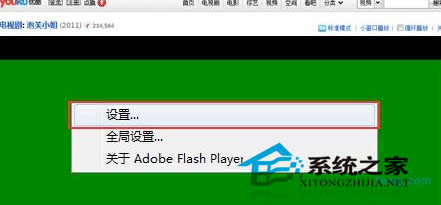
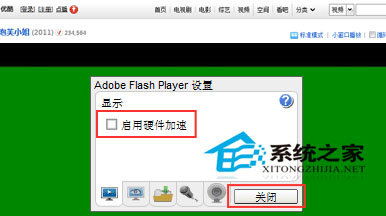
此法解決多數 Win7 綠畫面問題,屬 Flash 與顯示卡驅動相容性常見狀況。
Win10 黑科技:小冰入驻带来人工智能与图像识别,错误率 4.94% 超越人眼
Win7 找不到「網路芳鄰」?其實已改名為「網路」— 三種快速找法
在行動硬碟安裝虛擬機 (Qemu) 打造隨身多系統:WinXP/Win7/Win8 隨插即用
Win10 讓資料夾圖示顯示自訂文字,善用預覽縮圖機制一眼識別內容
Windows 7 變更日期、時間與數字格式教學:自訂 AM/PM 顯示為上午/下午
Win10 安裝開發工具條件與步驟:加入 Insider、升級最新預覽版、安裝 VS2015 CTP6 + SDK