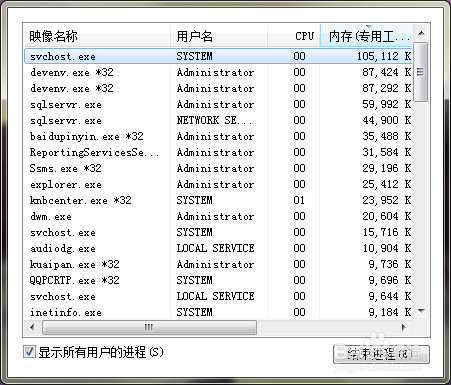
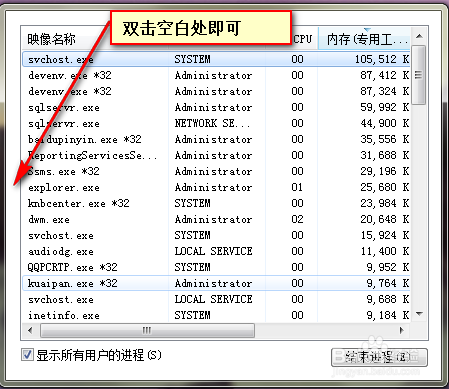
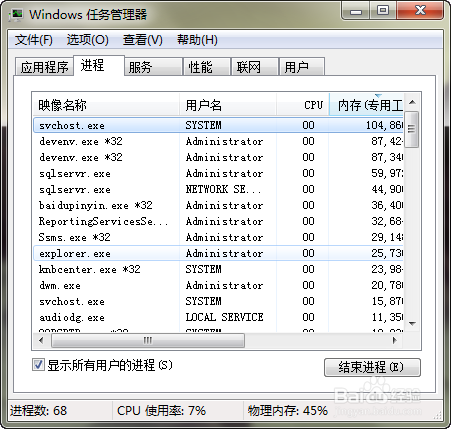
任務管理器若突然失去邊框、標題列、關閉/最小化/最大化按鈕,解決方法極簡單:在任務管理器視窗的空白處雙擊滑鼠左鍵,介面即可恢復正常。再次雙擊可切換回精簡模式。
相關推薦: Win7 任務管理器無法結束程序怎麼辦?、電腦任務管理器執行程序顯示不全三種解法、任務管理器邊框不見了怎麼辦?
Windows 7 修改系統聲音(開機/關機/提示音)完整教學
Win10 專業版找不到「說明與支援」?三種方式快速獲取系統協助
Windows 10 正式版升級常見問題彙總:四大類錯誤代碼、驅動程式、應用程式故障解決方案
將 Windows 10 開始功能表還原為 Windows 7 風格:移除所有動態磚
Win7 執行程式提示「libeay32.dll 遺失」四種修復方案
Windows 9 技術預覽版深度解析:迷你開始選單、版本號 6.4.9834、現代應用視窗化、扁平化圖示
《Win10 快速鍵大全》官方文件下載:英文版 3 頁含 40+ 操作,中文版可參考社群整理
Win8/Win8.1 系統頻繁斷網怎麼辦?三大解決方案徹底修復網路連線問題