許多用戶習慣安裝 Win8 主題,久而久之會殘留大量廢棄主題。以下提供兩種刪除方法:
方法一:透過「個人化」視窗刪除
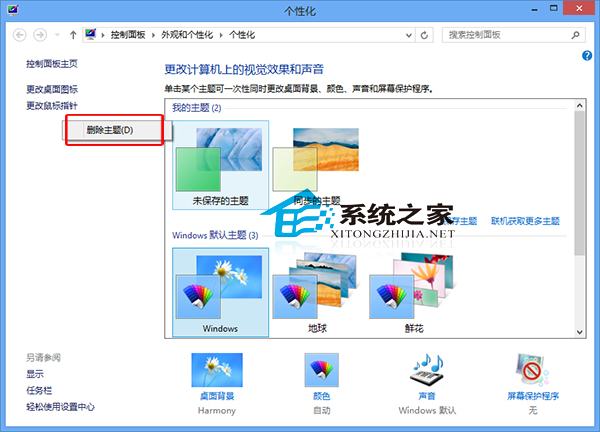
註:此法僅對「我的主題」有效。「Windows 預設主題」需用方法二。
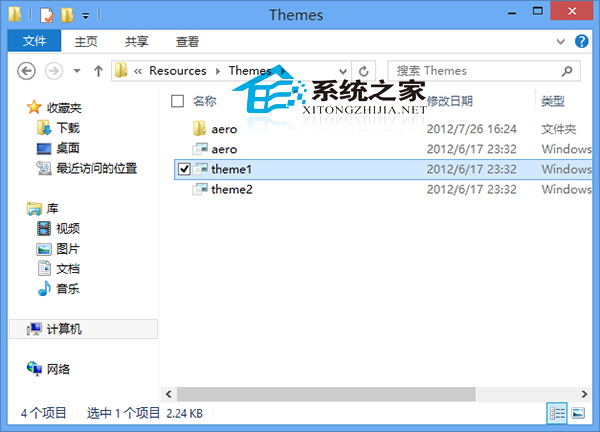
方法二:直接刪除主題資料夾檔案
Win8 主題資料夾路徑為 X:\Windows\Resources\Themes(X 為系統盤代號)。在該資料夾中刪除對應的 .theme 檔案及同名資料夾即可。
若安裝第三方主題,可透過優化大師破解限制後再安裝。
Win10 升級 $Windows.~BT 資料夾卡在 140MB 不動?耐心等待或改用 ISO 安裝
阻止 Windows 8 自動安裝驅動程式 (透過裝置安裝設定)
Windows 7 企業版/旗艦版批量修改檔案權限:icacls 指令完整教學與範例
Win10 Mobile 預覽版降級/回滾 WP8.1 教程:Windows Phone Recovery Tool 抹機還原 (附工具下載連結)
Win8/8.1 大規模藍畫面重啟事件:非硬體問題、疑第三方更新程式裝錯補丁
Win10 Mobile 14977 安裝錯誤 8007007B 怎麼辦?微軟:無解法,需等待下一版本推送