除了經典的 Win+Pause/Break 快捷鍵,Windows 10 還有兩種直覺的方式開啟「系統屬性」視窗,供不同習慣的用戶選擇。
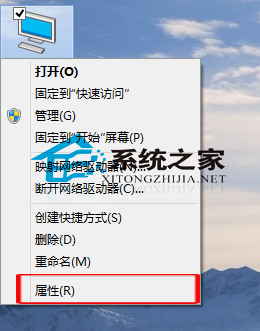
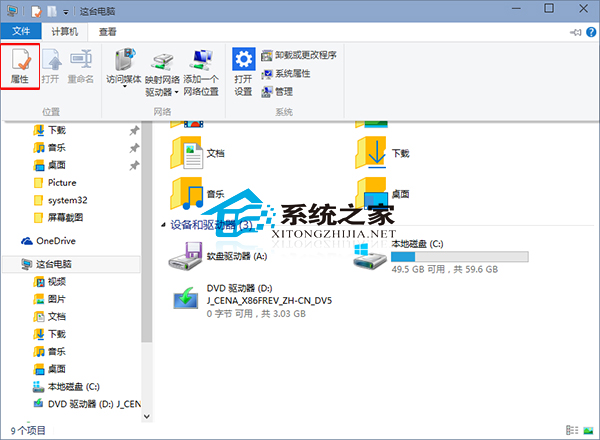
補充:「系統屬性」僅顯示基本配置資訊。若需更詳細硬體規格(顯示卡、聲卡、驅動版本等),請使用 DirectX 診斷工具 (Win+R 輸入 dxdiag)。
Win10 激活後系統資訊出現「下一步」按鈕?安裝最新更新補丁即可移除
Windows Server 2008 禁用本地連接埠雙法:Windows 防火牆新增阻擋規則 vs IPsec 原則深度防禦
Windows 10 Build 9926 官方 ISO 映像檔下載位址大全(含 22 語言版本與企業版)
Windows 版微信 2.3 發布:聊天記錄可備份至電腦、轉發多選會話、非系統語言文字翻譯、平板觸控優化
Win10桌面圖示文字過大?「僅變更文字大小」精準調整圖示字體
微軟 9/30 發布 Windows 9 或直接命名為 Windows:拋棄版本號、轉型服務導向
Win7 用戶注意:12 月更新含數位憑證信任清單補丁 (Xbox Live 私鑰洩露),需確認 KB2677070 已安裝才能自動更新