Windows XP Windows 7 Windows 2003 Windows Vista Windows 綜合教學 Linux 系統教學
Windows 10 Windows 8 Windows 2008 Windows NT Windows Server 電腦軟體教學
您现在的位置: Windows教程網 >> Windows教程 >  >> Windows 綜合教學 >> 關於 Windows

Win7 破解 Adobe Acrobat 9 Pro 教程:刪除授權檔案並輸入序號

編輯:關於 Windows

Adobe Acrobat 9 註冊教程:

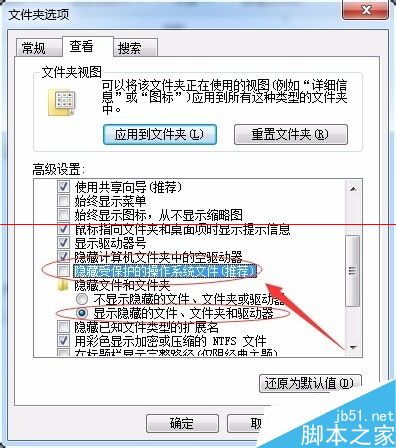
  1. 設定資料夾屬性顯示隱藏檔案。
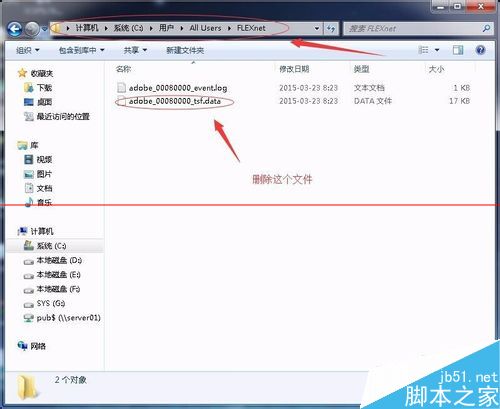
  2. 系統盤為 C 槽時,刪除:C:\Users\All Users\Application Data\FLEXnet\adobe_00080000_tsf.data。
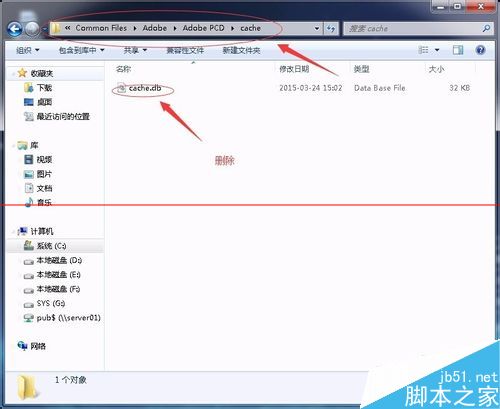
  3. 刪除 C:\Program Files\Common Files\Adobe\Adobe PCD\cache\cache.db(SQLite 資料庫檔)。
  4. 重新開啟 Acrobat 9,輸入以下序號任一組:
    1118 4756 9985 9882 7362 8611
    1118 4612 5432 9405 1652 8740
    1118 4418 0043 3745 4309 2816
    1118 4018 6583 4956 2486 7805

Copyright © Windows教程網 All Rights Reserved