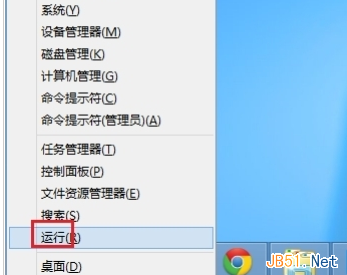
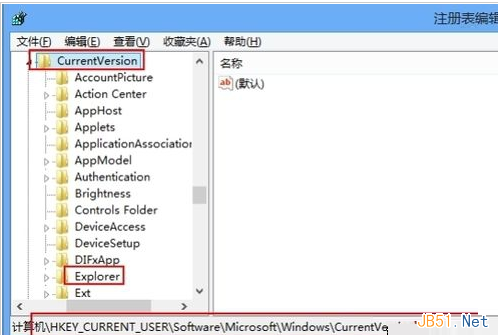
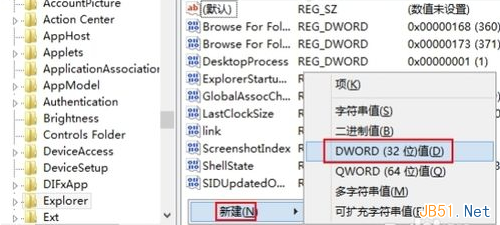
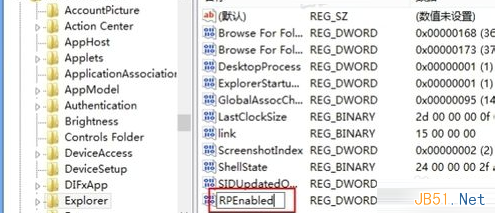
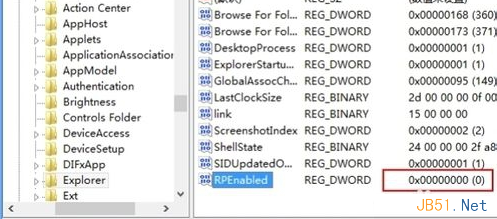
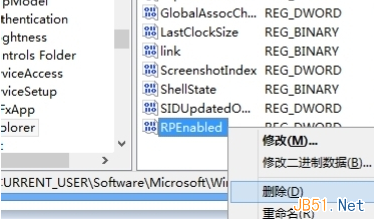
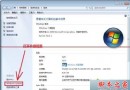
習慣 Win7 傳統桌面的用戶可透過登錄檔關閉 Win8 Metro 開始畫面:Win + X → 執行 → regedit → HKEY_CURRENT_USER\Software\Microsoft\Windows\CurrentVersion → 新增 DWORD RPEnabled = 0 → 重開機。欲恢復刪除該值即可。
regedit
HKEY_CURRENT_USER\Software\Microsoft\Windows\CurrentVersion
RPEnabled
0
此法不影響系統核心功能,僅隱藏 Metro 介面,適合傳統滑鼠鍵盤操作習慣用戶。
Win7 登入畫面自訂文字與標題:本地安全性原則 secpol.msc 設定
Windows 8 更新導致桌面無法載入(黑屏僅滑鼠)?系統還原與關閉自動更新解決
Windows 10 將任意資料夾(如回收站)固定到工作列的曲線救國教學
徹底關閉 Windows 8 操作中心使用者帳戶控制 (UAC) 通知
Windows 10 虛擬鍵盤新增英文輸入文字預測功能:類手機體驗,目前僅限搜尋場景
Win10 資源快速存取五大技巧:桌面圖示、資源管理器、工具列自訂全攻略
Win10 找不到 IE 瀏覽器?啟用 IE11 並從 Edge 快速叫出的兩招
Win7 Home Basic 家用初階版如何顯示「我的電腦」「回收站」等桌面圖示