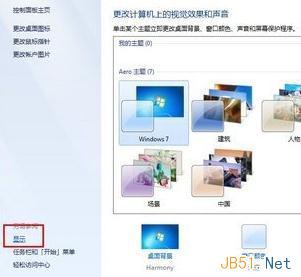
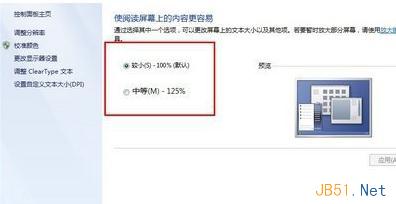
Windows 7 預設字體對長輩過小,可調整縮放比例:
簡單三步驟即可放大全系統文字,適合視力不佳使用者。
Win7 如何刪除殘留無用服務?註冊表清理教學
Win10 RS2 預覽版 14905 修復內容與已知問題彙總(PC 端)
Win10 Mobile 10586 正式版即將推送 Insider 用戶:增量更新鋪路,舊機型體驗參差不齊
Win10 隱藏登入介面啟用教學:激活增強版登入畫面
Win10 自訂鎖定畫面圖片:設定→裝置→鎖定畫面→瀏覽上傳
Win8.1 藍牙裝置提示「已停用」但服務正常?裝置管理員啟用藍牙介面卡即可
Win10 工作列搜尋列太佔空間?隱藏、只顯示圖示、完全關閉三種模式切換教學
Win10 無法開啟 Google 提示「糟糕,無法存取」?360 瀏覽器安裝「Google 存取助手」擴充功能一鍵解決