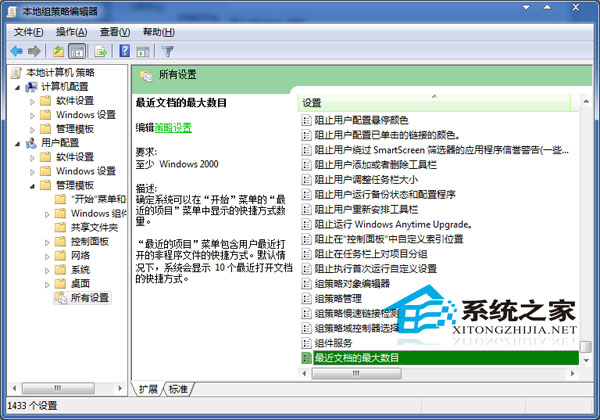
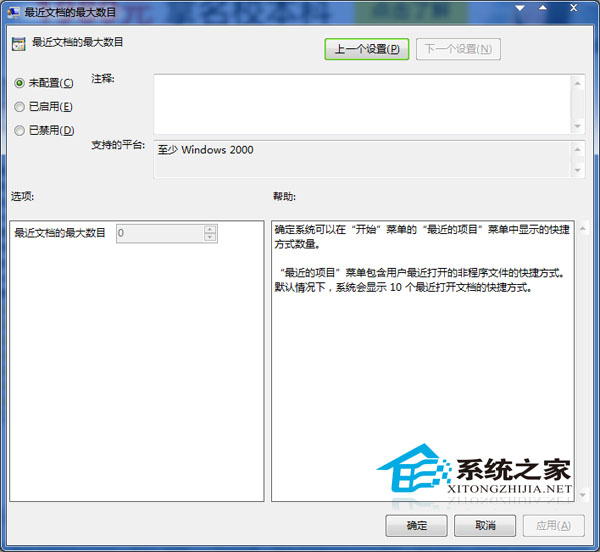
Win7 開始選單右側「最近開啟的檔案」清單數量不固定,透過群組原則可精確控制顯示筆數(或完全隱藏)。
gpedit.msc
10
生效後重啟或登出重登即可見效。適合偏好極簡開始選單、或需固定顯示特定數量近期檔案的用戶。
Win10 預覽版磁碟機代號重複顯示?匯入登錄檔修復 14295 磁碟重複 Bug
Win7 系統卡頓怎麼辦?用「Windows 體驗指數」找出效能瓶頸,針對性升級硬體
Win7 360 瀏覽器滾動條卡頓?NVIDIA 控制台指定核顯解決
Win10 升級卡住死機?Ctrl+Alt+Del 進緊急重啟避免強制關機損壞硬體
Win10 開發版本躍升至 10100,BUILD 大會將推重大公開預覽版
Windows 工作管理員遺失選單列與索引標籤?雙擊標題列邊緣即可修復
Windows 7 任務管理員無法結束程序?用指令強制終結進程
Win10 筆電鍵盤失靈?檢查 NumLock、驅動異常、快速啟動衝突、系統檔案損毀